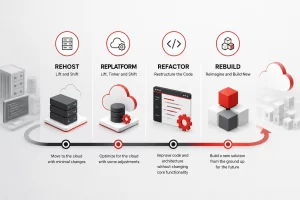

Modernizing a legacy application involves assessing your current system, defining clear business goals, choosing a strategy such as rehosting, replatforming, or refactoring, migrating data securely, testing thoroughly, and rolling out changes in phases. This step-by-step approach minimizes downtime, reduces risk, and helps your business gain the scalability, security, and performance modern software demands.
If you have ever sat in a budget meeting and watched half the IT spend disappear into “keeping the lights on” for a system nobody remembers building, you already understand why legacy application modernization has become one of the most urgent conversations in enterprise technology. Old software does not announce its own decline. It just gets slower, harder to patch, and more expensive to staff, until one day a routine update turns into a multi-week fire drill. Working with a partner such as Bantech Solutions’ legacy system transformation team can shorten that learning curve considerably, but whether you handle the work internally or bring in outside help, the process itself follows a fairly predictable path. This guide walks through that path in practical, sequential steps.
Why Legacy Modernization Keeps Landing on the Priority List
Every few years, a fresh wave of articles declares that legacy systems are finally dying out. They never quite do. Mainframes still process a staggering share of global financial transactions, and plenty of manufacturing, insurance, and government platforms are still running on code written before some of the engineers maintaining it were born. What has changed is the tolerance organizations have for the hidden costs these systems carry.
Those costs show up in a few predictable places. Maintenance eats a disproportionate share of the IT budget because patching brittle, poorly documented code takes far longer than working with modern, well-structured software. Talent becomes scarce, since fewer engineers want to build careers around languages and platforms that stopped being taught in universities a decade ago. Security exposure grows because vendors eventually stop issuing patches for end-of-life platforms, leaving known vulnerabilities open indefinitely. And perhaps most damaging of all, legacy systems typically cannot talk to the cloud services, APIs, and AI tools that competitors are using to move faster.
None of this means older systems are worthless. Many of them encode decades of business logic that would be reckless to throw away. The goal of modernization is not to discard that value. It is to carry it forward into an environment that is secure, scalable, and compatible with where technology is heading next.
Step 1: Take a Full Inventory Before You Touch Anything
It is tempting to jump straight into picking new technology, but skipping the assessment phase is one of the most common reasons modernization projects run over budget. Before any code changes, you need a clear picture of what you actually have.
This starts with a comprehensive audit of every application, integration, and dependency tied to the legacy system. Document which teams use it, what business processes rely on it, how much it costs to run and maintain each year, and where the biggest pain points are. Pay close attention to undocumented dependencies. Legacy systems accumulate quiet connections over the years, a scheduled export here, a manual data feed there, that nobody wrote down but everybody depends on.
A useful exercise during this stage is scoring each application against a handful of criteria: business value, technical health, security risk, and cost of ownership. Applications that score poorly on technical health but highly on business value are usually your top modernization candidates. Applications that score poorly on both may be better candidates for retirement rather than modernization.
Step 2: Define What Success Actually Looks Like
Modernization for its own sake rarely survives contact with a budget committee. Before you commit resources, get specific about the outcomes you are chasing. Are you trying to cut infrastructure costs by a certain percentage? Reduce the time it takes to deploy a new feature? Close a specific set of security or compliance gaps? Improve the customer-facing experience?
Write these goals down and attach measurable indicators to each one, such as reduced mean time to recovery, lower cloud spend per transaction, or faster onboarding for new engineers. According to Gartner’s CIO and Technology Executive research, application modernization consistently ranks among the top three technology priorities for enterprise leaders, which tells you two things: you are not alone in tackling this, and the organizations that treat it as a strategic initiative rather than a side project tend to get better outcomes.
Clear goals also help later when you are deciding between competing modernization approaches. If the objective is speed to market, a lighter-touch rehosting strategy might make more sense than a full rebuild. If the objective is long-term scalability, a deeper refactor is probably worth the extra investment.
Step 3: Choose the Right Modernization Strategy
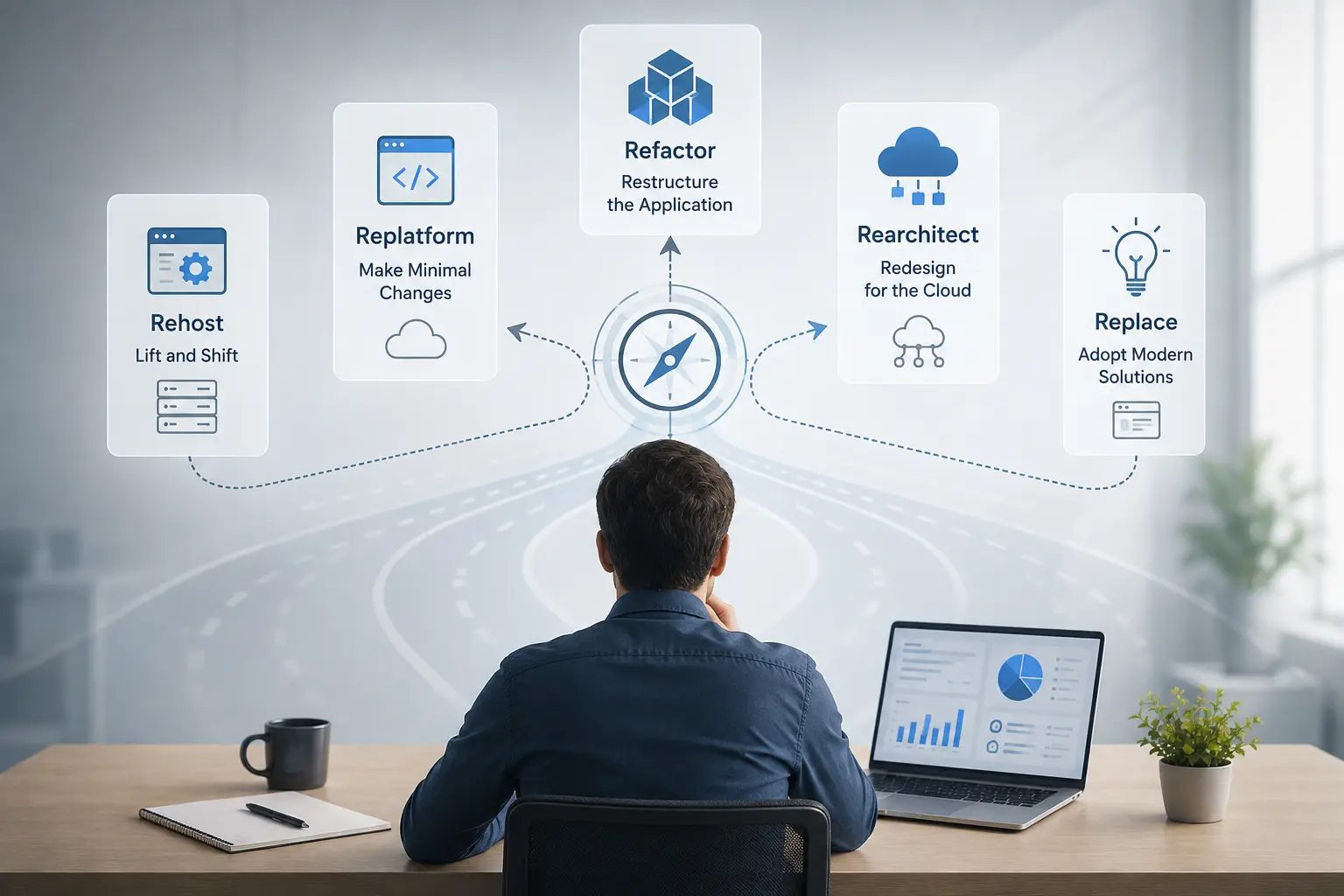
There is no single correct way to modernize an application, which is exactly why this step trips up so many teams. Gartner popularized a widely used framework that groups modernization approaches into seven options, often called the seven Rs. Gartner’s own guidance on the topic explains that the right approach depends entirely on the specific problem an organization is trying to solve, and the framework ranks these options roughly by ease of implementation, starting with simple encapsulation of existing functionality through an API and moving up toward a full rebuild or outright replacement at the more involved end of the spectrum.
Here is a simplified breakdown of the most common approaches:
- Encapsulate: Wrap the existing application’s data and functions in an API layer so newer systems can interact with it without touching the underlying code. This is a good option when the core logic still works but needs to be accessible to modern tools.
- Rehost: Move the application to new infrastructure, often the cloud, without changing its code. This is the fastest and lowest-risk option, sometimes called lift-and-shift.
- Replatform: Make small, targeted changes to take advantage of a new platform’s capabilities without altering the application’s core architecture.
- Refactor: Restructure and clean up the existing code to remove technical debt while preserving external behavior.
- Rearchitect: Make more substantial changes to the application’s architecture to unlock new capabilities, such as breaking a monolith into microservices.
- Rebuild: Redesign and rewrite the application from scratch while keeping the same scope and purpose.
- Replace: Retire the legacy application entirely and adopt a new solution, whether custom-built or off the shelf.
Most organizations end up using a mix of these approaches across their application portfolio rather than picking one strategy for everything. A customer-facing system with tight uptime requirements might get a careful, incremental refactor, while an internal reporting tool with low usage might simply be rehosted to cut hosting costs. Bantech’s transform legacy systems services typically start with exactly this kind of tailored assessment, matching each application to the modernization path that fits its actual risk profile and business value rather than applying a one-size-fits-all playbook.
Step 4: Build a Realistic Roadmap
Once you know what needs to change and roughly how you plan to change it, the next step is sequencing the work. Trying to modernize everything at once is a recipe for missed deadlines and frustrated stakeholders. A phased roadmap, prioritized by business impact and technical complexity, keeps the project manageable and gives you early wins to build momentum.
A good roadmap typically groups work into waves. The first wave usually targets applications with high business value and relatively low technical complexity, since these deliver visible results quickly and build confidence in the process. Later waves tackle the harder, more deeply entangled systems once the team has developed experience and established patterns that can be reused.
Risk mitigation belongs in the roadmap from the start, not as an afterthought. Identify what could go wrong at each stage, from data loss during migration to unexpected downtime during cutover, and build contingency plans before you need them. It is far cheaper to plan for a rollback strategy in advance than to improvise one during a live incident.
Step 5: Handle Data Migration With Extreme Care
Data migration is where modernization projects tend to run into the most unglamorous but consequential problems. Legacy systems often store data in formats, structures, or proprietary databases that do not map cleanly onto modern architectures. Getting this step wrong can mean corrupted records, broken reporting, or compliance violations that surface months after go-live.
Start by cataloging every data source tied to the legacy system, including any flat files, spreadsheets, or manual processes that have quietly become part of the data flow over the years. Design your new data model with input from the people who actually use the reports and dashboards downstream, since they will notice gaps that a purely technical review might miss. Run the migration in a staged, testable way rather than a single big-bang cutover whenever possible, validating data integrity at each checkpoint before moving forward.
Encryption and access controls should be part of the migration plan from day one, not bolted on afterward. Moving data is also an opportunity to fix long-standing security gaps, so it is worth the extra diligence.
Step 6: Execute in Phases, Not All at Once
There is a strong case for avoiding a single dramatic cutover in favor of a gradual, parallel-running approach. One widely referenced pattern for this is the strangler fig approach, where new services are built alongside the legacy system and gradually take over its responsibilities piece by piece until the old system can be safely retired. AWS engineers who have worked through large-scale monolith modernization projects have documented this approach in detail, and their guidance makes an important point: outdated technology on its own is never a good enough reason to modernize. The strategy only works when it is anchored to concrete business goals, like cutting operating costs, improving efficiency, or getting more value out of existing investments, rather than change for the sake of change.
Running the legacy and modernized systems in parallel does add complexity, particularly around keeping data synchronized between the two. But it drastically reduces the blast radius of anything that goes wrong, since only a slice of functionality is exposed to risk at any given time rather than the entire system. Teams that have gone through large-scale refactoring projects consistently report that this incremental approach, while slower on paper, tends to produce far fewer production incidents than attempting a single massive release.
Step 7: Test Like the Business Depends on It, Because It Does
Testing a modernized application is not just about confirming the new code works. It is about confirming the new system behaves the same way the old one did in every case that matters to the business, plus handles the new capabilities correctly. This means building out automated regression tests that cover the legacy system’s known behavior, including the edge cases and quirks that accumulated over years of patches.
Parallel testing, where the old and new systems process the same inputs and their outputs are compared, is one of the most reliable ways to catch discrepancies before they reach customers. Load testing matters too, especially if the modernized system is expected to handle more traffic or more concurrent users than the original ever did. Security testing, including vulnerability scans and penetration testing, should happen before go-live rather than after, since fixing a security gap in production is far more disruptive than catching it in staging.
Step 8: Roll Out Gradually and Train Your Teams
Even a technically flawless modernization can stumble if the people using the system every day are not prepared for the change. Rolling out to a small pilot group first, gathering feedback, and iterating before a full-scale release gives you a chance to catch usability issues that automated testing will never surface.
Training deserves more attention than most project plans give it. Employees who have used the legacy interface for years often have workarounds and mental shortcuts baked into their daily routines. Give them time to adjust, provide clear documentation, and make sure there is a support channel available for questions during the transition period. A rollout that technically succeeds but leaves frontline staff frustrated and unproductive is not really a success.
Step 9: Monitor, Optimize, and Keep Improving

Modernization does not end at launch. The weeks immediately following go-live are when you learn the most about how the new system actually performs under real-world conditions. Set up monitoring and alerting before launch, not after, so you can catch performance issues, error spikes, or unexpected usage patterns as soon as they appear.
Plan for a period of active optimization once the system is stable. This is when you tune database queries, adjust infrastructure sizing, and address the smaller bugs that only surface once real users start interacting with the system at scale. Ongoing support and maintenance should be budgeted for as a permanent line item, not treated as a one-time cost that disappears after the project wraps up.
Common Pitfalls Worth Avoiding
A few mistakes show up again and again across modernization projects, regardless of industry or company size.
Underestimating undocumented dependencies is one of the most frequent causes of delay. That report nobody remembers requesting but everybody depends on will surface eventually, usually at the worst possible time. Treating modernization as a purely technical project, without involving the business stakeholders who actually use the system, is another common trap. Skipping the assessment phase to save time almost always costs more time later, once unexpected complexity forces a mid-project pivot. And choosing the most ambitious modernization strategy simply because it sounds impressive, rather than matching the strategy to the application’s actual business value and risk profile, tends to waste both budget and goodwill.
What Modernization Typically Costs
Costs vary enormously depending on scope, complexity, and the modernization approach chosen. A simple rehosting project might run in the tens of thousands of dollars and take a few weeks, while a full rearchitecting or rebuild of a mission-critical enterprise system can run into the hundreds of thousands of dollars and take the better part of a year or more. Factors that push costs higher include the number of integrations involved, regulatory compliance requirements, the age and complexity of the original codebase, and how much custom business logic needs to be preserved.
A detailed technical assessment, including a code audit and infrastructure evaluation, is the best way to arrive at a realistic budget rather than relying on industry averages that may not reflect your specific environment.
It also helps to think about cost in terms of what inaction is already costing you, not just what modernization will cost going forward. Teams rarely track the full price of keeping an aging system alive, the overtime paid to the handful of engineers who still understand it, the opportunity cost of features that never got built because the platform could not support them, the support tickets that take three times longer to resolve than they should. Once those numbers are laid out next to the modernization estimate, the decision often looks less like a discretionary expense and more like an overdue correction.
Moving Forward With Confidence
Legacy modernization is rarely a quick project, and treating it like one is usually where things go wrong. The organizations that get the best results tend to be the ones that invest real time in the assessment and planning phases, choose a modernization strategy that matches the actual risk and value of each application, and roll out changes gradually rather than betting everything on a single cutover weekend.
If your team is weighing whether to tackle this internally or bring in outside expertise, it is worth exploring options like Bantech’s cloud strategy and migration services, which pair legacy modernization work with the broader cloud infrastructure decisions that often go hand in hand with it. Whichever path you choose, the fundamentals stay the same: understand what you have, define what success looks like, pick the right strategy for each system, and move forward in careful, testable phases.
Frequently Asked Questions
How long does legacy application modernization usually take? Timelines depend heavily on scope. A simple rehosting effort might wrap up in a few weeks, while a full rearchitecture of a complex enterprise system can take six months to well over a year.
Can legacy systems be modernized without replacing them entirely? Yes. Approaches like encapsulation, rehosting, and replatforming let you extend or move a legacy system’s value without a full rebuild, which is often faster and less risky.
What is the biggest risk during legacy modernization? Data loss or corruption during migration tends to carry the highest risk, which is why staged, validated migrations are almost always safer than a single big-bang cutover.
Do small businesses need to modernize legacy applications too? Smaller organizations often carry the same risks, security gaps, rising maintenance costs, limited scalability, just at a smaller scale, so modernization is worth evaluating regardless of company size.
Bringing It All Together
None of the nine steps above work well in isolation. A thorough assessment means little without a clear roadmap to act on it, and the most carefully chosen strategy can still fall apart if data migration or testing gets rushed at the end. The organizations that come out ahead are the ones that treat modernization as a sequence, assess first, define success, pick the right approach for each application, then migrate, test, and roll out in phases, rather than trying to shortcut their way to a finished platform. Get that order right, and the technical debt that has been quietly taxing your team for years finally starts working in your favor instead of against it.
Ready to modernize your legacy systems? Contact Bantech Solutions today to schedule a consultation and see how our team can help future-proof your business.