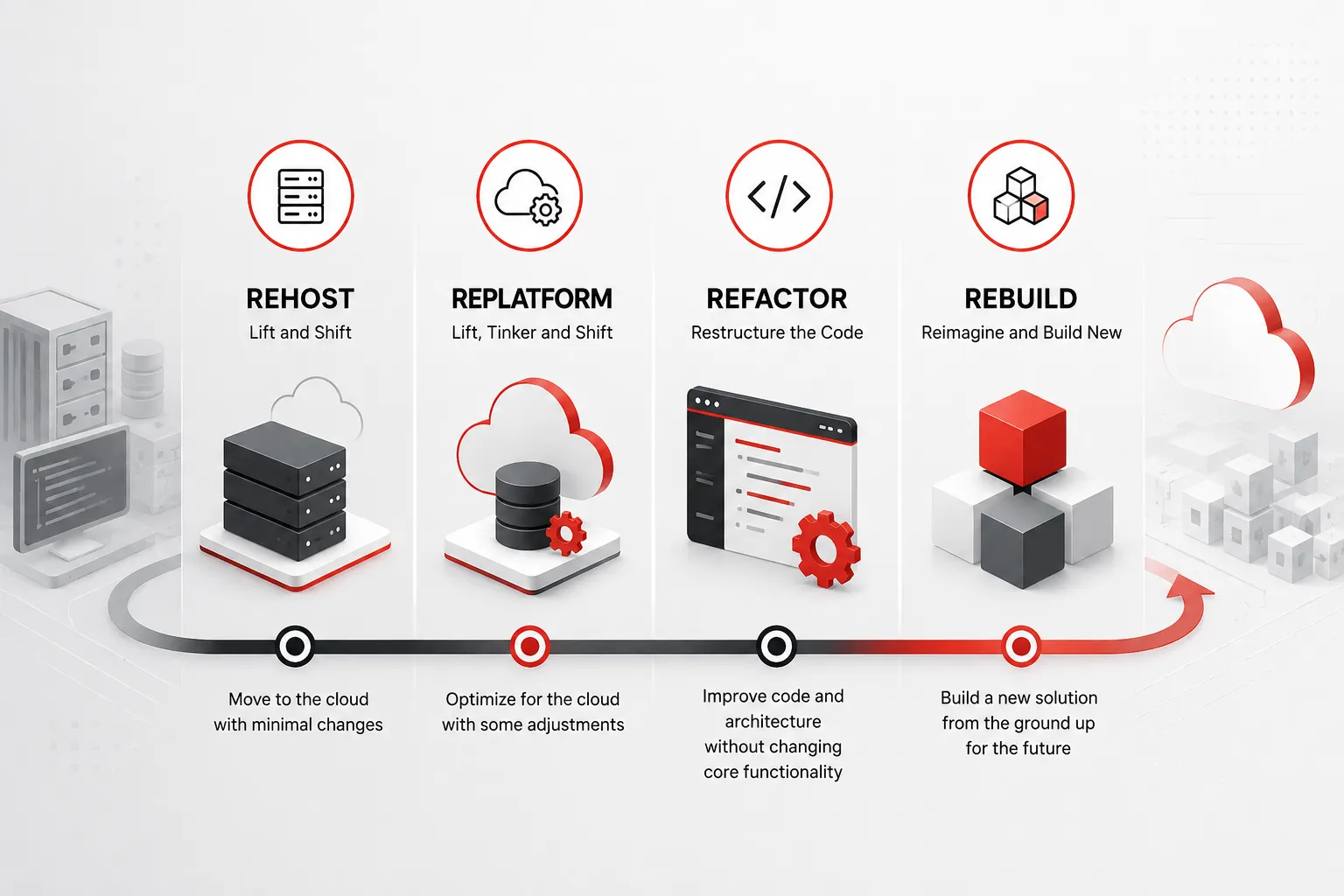

Rehosting moves an application to new infrastructure with no code changes, replatforming makes small cloud-friendly tweaks, refactoring restructures the code itself, and rebuilding replaces the application entirely from scratch. The right choice depends on your budget, timeline, risk tolerance, and how much long-term value the application still holds for the business today.
Every CIO eventually hits the same wall. The software that got your company to where it is today is now the thing standing between you and where you need to go next. Maybe it’s a twenty-year-old order management system that nobody fully understands anymore, or a monolithic application so tangled that a single bug fix takes three weeks instead of three hours. Whatever form it takes, the question is rarely “should we modernize?” It’s “which way do we modernize?” That’s where the four classic strategies come in, and getting the choice right is exactly the kind of work Bantech Solutions helps enterprise teams work through before a single line of code changes.
That short answer covers the basics, but the real decision is rarely that clean. Most organizations end up mixing all four approaches across their application portfolio, and figuring out which system gets which treatment is where a lot of modernization budgets quietly go sideways. This guide walks through each strategy in detail, when it makes sense, what it costs, and how to avoid the mistakes that turn a straightforward migration into a multi-year headache.
Why Legacy Modernization Became Unavoidable
It’s worth pausing on why this conversation is happening at all. Legacy systems don’t fail loudly. They fail quietly, in the form of rising maintenance bills, engineers who spend more time patching old code than building anything new, and a growing gap between what customers expect and what the software can actually deliver.
Research from McKinsey found that technical debt can account for roughly 40 percent of the value tied up in a large enterprise’s technology estate, and companies often pay an extra 10 to 20 percent on top of any new project’s budget just to work around it. That’s not a rounding error. It’s a structural drag on everything from product launches to security posture, and it tends to get worse the longer it’s ignored, since every quick fix layered on top of an aging system makes the next change harder and riskier.
There’s also a competitive angle that’s easy to underestimate. Modern customers expect real-time updates, mobile-friendly interfaces, and integrations with the tools they already use. A system built in the early 2000s was never designed with any of that in mind, and bolting those capabilities on after the fact is often more expensive than starting with a platform that supports them natively. Add in the security exposure of running on unsupported operating systems or unpatched frameworks, and the case for modernization writes itself. The harder question is always execution, not motivation.
The Four Modernization Strategies, Explained
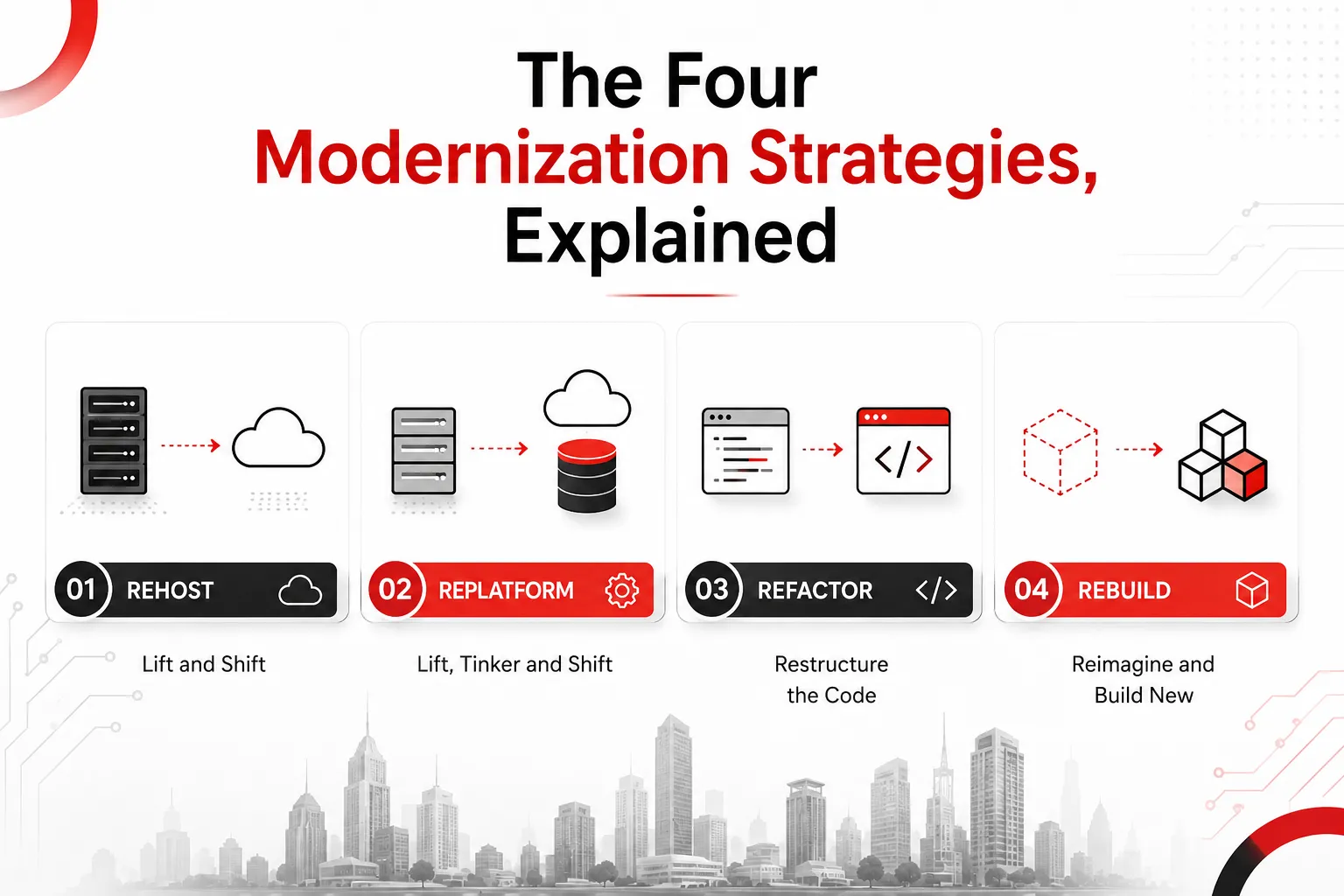
The framework most teams use traces back to a model originally proposed by Gartner and later expanded by AWS into what’s commonly called the “6 Rs” or “7 Rs” of migration. For the purposes of legacy application decisions, most conversations boil down to four practical paths: rehost, replatform, refactor, and rebuild. Each one trades speed, cost, and risk against long-term flexibility in a different way.
Rehost: The Lift and Shift
Rehosting is the simplest of the four. You take the application as it exists today, source code, configuration, and all, and move it to new infrastructure, usually the cloud, without changing how it works internally. Think of it like moving a house across town in a moving truck. Nothing about the house itself changes; only its address does.
This approach is popular for a reason. It’s fast, it’s relatively cheap, and it doesn’t require deep architectural knowledge of an application that might be poorly documented or maintained by people who’ve long since left the company. According to AWS’s own guidance on large-scale migrations, rehosting lets teams move a large number of workloads without worrying about compatibility issues or long cutover windows, which is exactly why it’s the default strategy for time-sensitive migrations like a data center lease expiring or hardware reaching end of life.
The catch is that rehosting doesn’t actually solve the underlying problem. You’ve moved the legacy application to newer infrastructure, but the code, the architecture, and the technical debt all came along for the ride. It buys you time and often reduces infrastructure costs, but it rarely improves scalability, performance, or maintainability on its own. Many organizations treat rehosting as step one of a longer journey rather than a final destination, planning to replatform or refactor once the application is safely off legacy hardware.
Best for: Applications under a hard deadline, workloads that are otherwise stable and low-risk, or situations where the team needs a quick win to build momentum for a larger modernization program.
Typical timeline: A few weeks for a single application, though large portfolios can take longer depending on dependency mapping.
Replatform: Lift, Tinker, and Shift
Replatforming sits a notch above rehosting on the effort scale. You still move the application to new infrastructure, but this time you make targeted, incremental improvements along the way. That might mean swapping a self-managed database for a managed cloud service, moving from a Windows server to Linux, or containerizing an application without touching its underlying code.
The appeal here is the ratio of effort to payoff. Teams using this approach often see meaningful gains, reduced operational overhead, better security posture, lower licensing costs, without taking on the cost or risk of a full rewrite. It’s sometimes described as “lift, tinker, and shift,” and that “tinker” is doing a lot of work. You’re not redesigning the application, but you’re making it noticeably more efficient to run.
Replatforming does require more planning than rehosting. You need to understand which components of the application can be swapped out safely and which ones are too tightly coupled to touch without breaking something. This is usually where a legacy system audit pays for itself, since it surfaces dependencies and integration points that aren’t obvious just from looking at a server inventory.
Best for: Applications that are functionally sound but expensive or inefficient to operate, especially when a managed service can replace something the internal team currently maintains by hand.
Typical timeline: Four to eight weeks for a moderately complex application, longer if database migration is involved.
Refactor: Restructuring for the Long Term
Refactoring is where things get more involved. Instead of just relocating the application, you restructure and optimize the existing code, often to take advantage of cloud-native capabilities like microservices, containers, or serverless functions. The application still does what it did before, but how it does it changes substantially under the hood.
This strategy tends to show up when a monolithic application is actively blocking the business, when release cycles have slowed to a crawl because every change risks breaking something unrelated, or when the system needs to scale in ways its original architecture simply can’t support. Refactoring also comes into play when compliance requirements demand a level of data isolation or auditability that the current architecture wasn’t built for.
The payoff can be substantial. Breaking a monolith into services, for example, lets different teams deploy independently, scale only the components that need it, and isolate failures instead of letting one bug take down the entire system. But refactoring is also the most technically demanding of the four strategies, and it’s not something to take on lightly. AWS’s own prescriptive guidance for large migrations specifically advises against refactoring during a large-scale move, recommending instead that teams rehost or replatform first and modernize the application afterward, precisely because refactoring introduces the most complexity and risk per application.
Best for: Business-critical applications where the current architecture is genuinely limiting growth, scalability, or release velocity, and where the organization has the engineering capacity to see the project through.
Typical timeline: Two to six months for a single application, and often longer for anything touching core business logic or regulated data.
Rebuild: Starting Over, Deliberately
Rebuilding is the most drastic option: you retire the old application entirely and build a new one from the ground up, keeping the original scope and business logic in mind but not constrained by the old codebase. This is different from repurchasing an off-the-shelf product; a rebuild is a custom application designed specifically around your current and future needs.
Organizations reach for this option when the legacy system has become genuinely unmaintainable, when the original source code is missing or undocumented, when the technology stack is so obsolete that finding developers who can work with it has become its own crisis, or when the business has evolved so far beyond the system’s original design that patching it further would cost more than starting fresh.
Rebuilding is expensive and time-consuming, and it carries real business risk, since running two systems in parallel during the transition, or cutting over all at once, both come with their own challenges. But it’s also the only strategy that fully resets the technical debt clock. When done well, a rebuild gives the organization a clean architectural foundation that can support years of future growth without the constant compromises that come from working around decades-old design decisions.
Best for: Applications where the cost of continuing to maintain the legacy system exceeds the cost of building new, or where the business has fundamentally outgrown what the old system was ever designed to do.
Typical timeline: Six months to well over a year, depending on scope, integrations, and data migration complexity.
How to Actually Choose Between Them
Reading through four strategies is one thing. Deciding which one applies to a specific application in your portfolio is another. A few questions tend to cut through the noise faster than anything else.
How much business value does this application still generate? A system that drives revenue or serves a large customer base deserves more investment than an internal tool used by a handful of employees. Not every application needs a rebuild, and forcing one on a low-value system wastes budget that could go toward something more strategic.
What’s actually broken? If the problem is cost and infrastructure, rehosting or replatforming likely solves it. If the problem is that the codebase itself is fragile, hard to test, or blocking new features, no amount of infrastructure migration fixes that; you need to refactor or rebuild.
How much time do you have? Deadlines matter more than people like to admit. If a data center contract is expiring in ninety days, refactoring six applications isn’t realistic, and rehosting becomes the pragmatic choice even if it’s not the ideal long-term answer.
What’s your risk tolerance, and what happens if this goes wrong? Applications tied to regulatory compliance, financial transactions, or safety typically warrant a more cautious, incremental approach, favoring rehost or replatform first, with refactoring done later in a controlled environment once the system is stable on new infrastructure.
Do you have the internal expertise, or do you need a partner? Refactoring and rebuilding both demand architectural skill that not every internal team has readily available, especially for organizations whose engineers have spent years maintaining rather than building. This is often the point where bringing in outside expertise changes the outcome significantly. Bantech Solutions works through exactly this kind of comprehensive assessment and strategic roadmap with clients before recommending a path, because the wrong strategy applied to the right application, or the right strategy applied to the wrong application, both waste time and money.
Most enterprise portfolios end up using a mix of all four strategies rather than picking one and applying it everywhere. A company might rehost a dozen low-priority internal tools to hit a deadline, replatform its customer database to a managed service, refactor its order processing system because scalability is genuinely limiting sales, and rebuild a customer portal that’s simply too far gone to save. That mixed approach isn’t indecision; it’s the realistic outcome of treating each application on its own merits instead of forcing a one-size-fits-all policy across a diverse portfolio.
Common Mistakes That Derail Modernization Projects
A few patterns show up again and again in modernization projects that go over budget or stall entirely.
Treating rehosting as the finish line. Moving an application to the cloud without any plan to improve it later just moves the technical debt to a new zip code. It’s a valid first step, but it needs to be followed by a real plan for what comes next.
Refactoring everything at once. Big-bang rewrites of tightly coupled systems tend to underestimate hidden dependencies. A phased approach, sometimes called the strangler pattern, where new functionality gradually replaces old components while both run in parallel, tends to produce far better outcomes than trying to swap the entire system in one cutover.
Skipping the discovery phase. Teams that jump straight into migration without a proper audit of dependencies, data flows, and integration points routinely discover expensive surprises midway through the project. A thorough assessment upfront costs far less than the rework caused by skipping it.
Underestimating data migration. Moving the application is often the easy part. Moving years of accumulated data, cleaning it up, mapping it to a new schema, and validating its integrity, is usually where projects lose the most time.
Ignoring the people side of the transition. Employees who’ve worked with a legacy system for years have workarounds and informal knowledge baked into their daily routines. Training and change management deserve as much attention as the technical migration itself, or adoption suffers even after a technically successful rollout.
What Modernization Unlocks Beyond the Immediate Fix

It’s easy to frame modernization purely as debt reduction, but the upside extends well beyond fixing what’s broken. Modern, well-architected systems integrate far more easily with the tools businesses increasingly depend on: AI-driven analytics, automation platforms, and third-party APIs that simply don’t play well with rigid legacy architectures. A cloud-native, modular application can also scale on demand instead of requiring expensive hardware upgrades every time usage grows, and it typically supports faster release cycles, letting teams ship improvements in days instead of months.
Security is another area where the benefits compound. Legacy systems running on unsupported platforms are disproportionately targeted by attackers precisely because known vulnerabilities go unpatched. Modernized systems can adopt current encryption standards, automated patch management, and compliance frameworks like GDPR, HIPAA, or PCI-DSS far more readily than something built before those requirements existed.
Bringing In the Right Support
None of these four strategies is inherently right or wrong. The mistake isn’t choosing rehost over refactor or vice versa; it’s applying either one without a clear-eyed assessment of what the application actually needs and what the business can realistically absorb in terms of cost, timeline, and disruption. That assessment is usually harder to do objectively from inside an organization that’s been living with the system’s quirks for years, which is exactly why so many companies bring in a partner for the audit and planning phase, even if internal teams handle much of the execution.
A good modernization partner will walk through your entire application portfolio, flag which systems are quick wins, which ones need deeper surgery, and which ones have simply reached the end of their useful life, and build a roadmap that sequences the work in a way that minimizes disruption to daily operations. That sequencing matters as much as the individual strategy choices, since trying to modernize everything simultaneously is one of the fastest ways to blow both budget and timeline.
Final Thoughts
Legacy modernization isn’t a single decision; it’s dozens of smaller decisions made application by application, each one weighing cost against risk against long-term value. Rehosting gets you off aging infrastructure quickly. Replatforming captures meaningful efficiency gains without a full rewrite. Refactoring addresses architectural limitations that are genuinely holding the business back. Rebuilding gives you a clean slate when the old system has simply run its course. The organizations that get the most value out of modernization aren’t the ones that pick a single strategy and force every application through it. They’re the ones that assess honestly, sequence deliberately, and treat the process as an ongoing discipline rather than a one-time project.
Frequently Asked Questions
What’s the difference between rehosting and replatforming? Rehosting moves an application to new infrastructure with zero changes to the code. Replatforming does the same move but includes small, targeted improvements, like swapping a self-managed database for a managed cloud service, that don’t require touching the core application logic.
Is refactoring always better than rehosting? Not necessarily. Refactoring delivers more long-term value but costs more time and money upfront. If an application is stable, low-risk, and under time pressure, rehosting is often the more sensible near-term choice, with refactoring planned for later once the system is safely migrated.
How long does a typical legacy modernization project take? It depends heavily on scope. A simple rehost can take a few weeks, replatforming usually runs four to eight weeks, refactoring often spans two to six months, and a full rebuild can take six months to well over a year for complex, data-heavy applications.
Can I mix strategies across a single application portfolio? Yes, and most organizations do. It’s common to rehost lower-priority systems quickly, replatform applications where managed services offer clear savings, and reserve refactoring or rebuilding for the handful of systems that truly need architectural change.
Do I need to modernize everything at once? No. A phased approach, prioritized by business value and risk, almost always outperforms trying to modernize an entire portfolio simultaneously. Trying to do everything at once is one of the most common reasons modernization budgets run over.