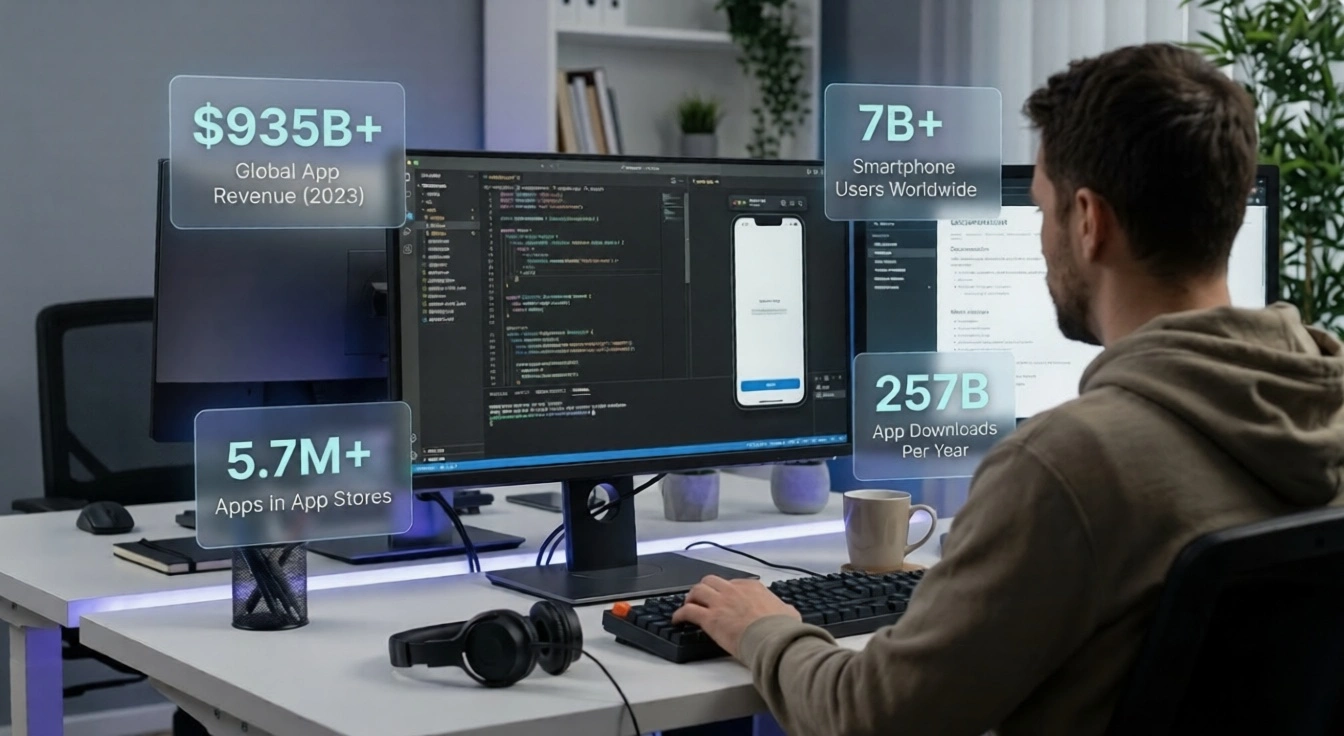
We are living in the golden age of mobile applications. With more than 7 billion smartphone users worldwide and global mobile app revenues surpassing $935 billion in 2023, it has never been a better time to bring your app idea to life. Whether you want to solve a daily problem, entertain millions of people, or simply build a passive income stream from your smartphone screen, creating a mobile application can make it all possible.
The best part? You do not need to be a Silicon Valley insider or have a massive corporation behind you to launch a successful app. Entrepreneurs, solo founders, small businesses, and even students are creating apps that generate thousands of dollars every month. The playing field is more level than ever — and with resources like outsourcing mobile application development work to expert teams abroad, your great idea can reach the market faster and more affordably than you might imagine.
In this comprehensive guide, we answer every pressing question you may have about building a mobile app — from the very first dollar you will spend to the very last dollar your app could earn. Let us dive in.
App Market Snapshot
$935B+
Global App Revenue (2023)
7B+
Smartphone Users Worldwide
257B
App Downloads Per Year
How Much Money Does It Take to Create a Mobile App?
One of the most encouraging truths about mobile app development today is that the cost spectrum is incredibly wide — meaning there is a realistic path for almost every budget. The total investment required depends on several factors, including app complexity, the platforms you target (iOS, Android, or both), design requirements, backend infrastructure, and who builds it for you.
Here is a clear breakdown of what you can expect at each budget tier:
| App Complexity | Description | Estimated Cost Range |
|---|
| Simple App | Basic UI, minimal features (e.g., calculator, to-do list, flashcard app) | $3,000 – $15,000 |
| Moderate App | User login, database integration, push notifications, social sharing | $15,000 – $50,000 |
| Complex App | Real-time features, payment gateway, maps, AI/ML, multi-platform | $50,000 – $150,000+ |
| Enterprise App | Large-scale systems, advanced security, CRM/ERP integration | $150,000 – $500,000+ |
The Good News
You do not need the full budget upfront. The smartest founders start with a Minimum Viable Product (MVP) — a stripped‑down version of their app with only the core features — and launch with as little as $5,000–$10,000. Once the app gains traction and starts generating revenue, reinvesting in new features becomes a natural, self‑funding cycle.
Additional recurring costs to keep in mind include Apple Developer membership ($99/year), Google Play developer registration ($25 one-time), hosting and cloud services ($50–$500/month depending on traffic), and ongoing maintenance — typically 15–20% of the original development cost per year to keep the app updated and bug-free.
The most cost-effective route many founders take today is partnering with development teams in countries like India, where the cost of skilled labor is significantly lower without any compromise on quality. This allows you to build a world-class app for a fraction of the price you would pay in the US or UK.
Is Owning an App Profitable?
Absolutely, yes — and the numbers are thrilling. App ownership can be one of the most profitable digital assets you can hold. Unlike a physical business, a mobile app can operate 24 hours a day, 7 days a week, serving users across multiple time zones without you doing a single hour of extra work after the initial build.
The key to profitability lies in your monetization strategy. Successful app owners typically use one or a combination of the following models:
Users buy virtual goods, premium content, extra lives, filters, or features within the app. This is the most powerful revenue model — games like Clash of Clans and Candy Crush generate billions annually through IAP alone.
Users pay a recurring monthly or annual fee for premium access. Apps like Headspace, Duolingo, and Spotify generate predictable, recurring revenue through this model — often the most stable income stream for app owners.
Displaying ads to free users is an excellent way to monetize at scale. With the right ad network (Google AdMob, Meta Audience Network), even a modest app with 50,000 monthly active users can earn $1,000–$5,000 per month passively.
Offer the app for free with basic features, and charge for unlocking the premium tier. This dramatically lowers the barrier to entry, grows your user base quickly, and converts a healthy percentage to paid users over time.
Charge users a one-time fee to download the app. While this model has declined in popularity with the rise of freemium, it works beautifully for niche productivity tools and specialized professional apps where the audience is already motivated to pay.
The Monetization Reality
A well‑executed app with just 10,000 loyal daily active users can generate between $3,000 and $30,000 per month — depending on your monetization mix. Profitability is not about having millions of downloads; it is about knowing your audience and serving them exceptionally well.
The app market rewards focus and quality. When you build something genuinely useful, design it beautifully, and market it intelligently, the profits follow naturally and consistently.
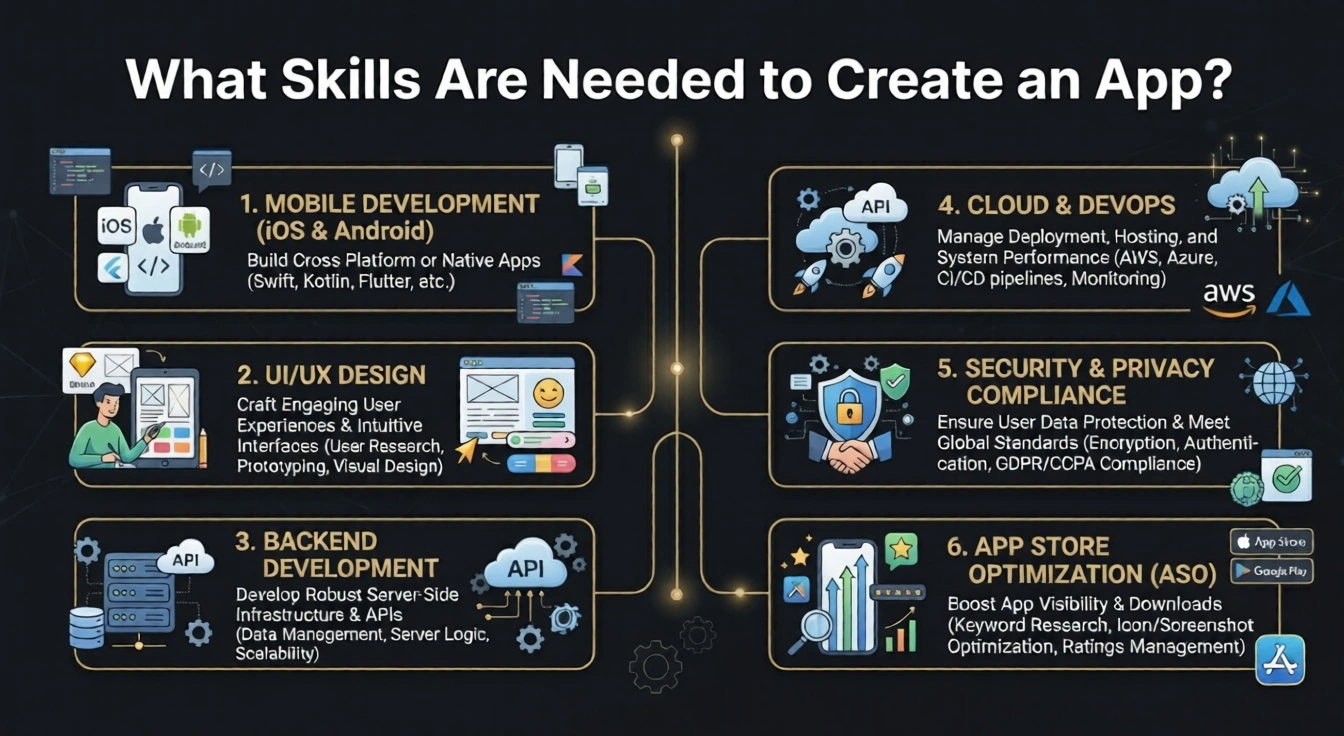
What Skills Are Needed to Create an App?

The modern app development ecosystem has made it more accessible than ever before to turn an idea into a product. The good news is that you do not need to master every skill yourself — what matters most is understanding which skills the project requires so you can either learn them or find the right people to fill the gaps.
- Mobile Development (iOS & Android)
For native iOS apps, Swift or Objective-C is the standard. For Android, Kotlin or Java is preferred. Cross-platform frameworks like Flutter (Dart) and React Native (JavaScript) let you build both with a single codebase — an excellent choice for startups and first-time founders.
Your app’s design is what users notice first and remember longest. Great design requires knowledge of tools like Figma or Adobe XD, a strong understanding of human-computer interaction principles, and a genuine empathy for how real users interact with screens.
Most apps need a server-side component — a backend that manages user data, authentication, and APIs. Node.js, Python (Django/Flask), Ruby on Rails, and Firebase are popular choices that power the invisible engine behind your app.
Storing and retrieving data efficiently is fundamental. Skills in databases like PostgreSQL, MySQL, MongoDB, or Firebase Firestore are essential for any app that handles user accounts, content, or transactions.
Deploying and scaling your app on platforms like AWS, Google Cloud, or Microsoft Azure requires DevOps knowledge. Continuous integration, automated testing pipelines, and server monitoring are what separate a prototype from a production-ready product.
- Security & Privacy Compliance
Any app handling user data must comply with standards like GDPR and CCPA. Knowledge of data encryption, secure authentication (OAuth 2.0, JWT), and secure API design protects your users and keeps your app out of legal trouble.
- App Store Optimization (ASO)
Building the app is half the battle — getting it discovered is the other. ASO involves keyword research, compelling screenshots, optimized descriptions, and a review strategy to climb the rankings on the App Store and Google Play.
The encouraging reality is that no single developer or founder is an expert in all of these areas. Successful apps are almost always team efforts — or the product of a founder pairing their vision with talented specialists.
Can I Build a Mobile Application by Myself?
Yes, you absolutely can — and thousands of self-taught developers have proven it is possible. With resources like Udemy courses, YouTube tutorials, documentation from Apple and Google, and powerful no-code/low-code platforms such as Bubble, Glide, and FlutterFlow, a motivated individual can build functional, publishable apps without a team behind them.
That said, it is worth taking a clear-eyed look at the very real challenges you will face on the solo development path — not to discourage you, but so you can plan for them intelligently and make the choice that truly serves your goal best.
- The Time Investment Is Massive
Learning a new programming language to professional proficiency typically takes 6–18 months of consistent practice before you can build something polished enough for public release. Every month your app is not in the market is a month your competitors potentially are.
- Wearing Every Hat Is Exhausting
As a solo developer, you are simultaneously the product manager, designer, frontend developer, backend engineer, QA tester, and marketing strategist. The cognitive load of context-switching between these disciplines slows progress dramatically and often leads to burnout before launch.
- Debugging Without a Team Takes Forever
What an experienced team resolves in hours can take days or weeks when you are learning on the job. Bugs compound, technical debt accumulates, and what starts as a simple app becomes an increasingly complex problem to manage alone.
- Keeping Up with Rapid Platform Changes
Apple and Google regularly release major OS updates that can break existing functionality. Staying current with API deprecations, new guidelines, and security patches is a continuous full-time responsibility on top of building new features.
- Hidden Costs Add Up Quickly
Design tools, testing devices, cloud infrastructure, third-party SDKs, app store fees, and marketing costs mean that the money you thought you were saving by going solo often disappears into tools and services — without the efficiency gains of an experienced team.
This is precisely why many of the world’s most successful app founders — even technically skilled ones — choose to partner with professional development agencies. Countries like India have emerged as the global leader in app outsourcing, offering world-class engineering talent, robust project management processes, and rigorous quality standards at a cost that is 60–80% lower than comparable teams in North America or Western Europe.
🌟 Thinking About Outsourcing?
If you have a great mobile app idea and want it built right the first time — on schedule and within budget — working with a trusted development partner can be the smartest decision you make. Teams based in India combine deep technical expertise, transparent communication, and genuinely economical pricing to give you the best of all worlds.
Bantech Solutions is one such quality-focused, economical outsourcing partner with a proven track record of delivering polished, market-ready mobile applications for businesses and entrepreneurs globally. Their mobile development team handles everything from concept to deployment — so you can stay focused on growing your business.
Explore Mobile App Development →
How to Earn $500 Per Day from Mobile App Development
Earning $500 per day — that is $15,000 per month — from the mobile app world is a completely realistic goal, and many independent developers and app entrepreneurs achieve it. The key is understanding that there is more than one proven path to get there, and the best one for you depends on your skills, your timeline, and how much you want to be involved in the technical side.
- Build and Monetize Your Own App Portfolio
Rather than betting everything on a single app, build a portfolio of 3–5 focused niche apps, each targeting a specific audience. Monetizing each with subscriptions and in-app advertising creates diversified, compounding passive income that can collectively reach $500/day well before a single blockbuster app would.
- Launch a Subscription-Based App
At $9.99/month per subscriber, you need just 1,500 active subscribers to hit $15,000/month — roughly $500/day. A focused productivity tool, a meditation or fitness app, a learning platform, or a niche professional tool can reach this milestone faster than most people realize, especially when paired with smart content marketing and a freemium entry point.
- Offer App Development as a Freelance Service
Experienced mobile developers regularly charge $75–$200 per hour. Working even 4–6 hours per day for clients puts $300–$1,200 in your pocket daily. Platforms like Upwork, Toptal, and Clutch connect skilled developers with clients actively looking for exactly this expertise.
- Create and Sell App Templates or Source Code
Platforms like Envato Market (CodeCanyon) allow you to sell app templates and source code packages. A well-built Flutter or React Native template for a popular app category (dating, food delivery, e-commerce) can sell hundreds of copies at $30–$80 each, generating passive income month after month.
- Acquire and Flip Existing Apps
A growing number of investors buy underperforming apps on marketplaces like Flippa, invest in design and marketing improvements, and resell them at 2–4x the purchase price. A single successful flip can generate $10,000–$50,000 — the equivalent of months of the $500/day target in one transaction.
- Partner with Brands for Sponsored App Experiences
Apps with an engaged audience of 50,000+ users can attract sponsorship deals with brands relevant to their users. A fitness app, a travel guide, or a parenting tool can command $2,000–$10,000 per month from a single well-matched sponsor — a clean, non-intrusive path to serious revenue.
Pro Tip
The fastest path to $500/day is combining a subscription app (recurring revenue) with freelance app development work. As your app grows, the passive income replaces the active income — giving you total financial and professional freedom.
How Much Can a 1,000-Downloads App Make?
This is one of the most refreshingly hopeful questions in the mobile app business — because the answer is: often much more than you would expect, and the ceiling is higher than most first-time app owners realize.
The revenue from 1,000 downloads is not a fixed number — it is a function of your monetization model, your audience, and how much value your app genuinely delivers. Here is what each major model looks like at the 1,000-download level:
App Monetization Models
| Monetization Model | Assumptions | Estimated Monthly Revenue |
|---|
| In‑App Advertising | 500 active users/month, moderate engagement, CPM of $4 | $150 – $400/month |
| Freemium → Subscription | 5% conversion at $4.99/month premium tier | $250/month (recurring) |
| Paid App ($2.99 download) | 1,000 downloads × $2.99 (after 30% store cut) | $2,093 (one‑time) |
| In‑App Purchases | 10% purchase rate, average spend of $3.50 | $350/month |
| Combined Model | Ads + subscriptions + occasional IAP | $500 – $1,200/month |
The truly exciting insight here is that 1,000 downloads is not an endpoint — it is a launchpad. Apps that solve a real problem tend to grow organically through word-of-mouth, App Store reviews, and ASO improvements. Many apps that started at 1,000 downloads reach 100,000 within their first year, scaling their revenue proportionally. The work of getting to 1,000 is largely the same as the work of getting to 100,000 — the difference is time and iteration.
The Growth Mindset
Every app that reached 10 million downloads started with just 10. The first 1,000 downloads are not your ceiling — they are your proof of concept.
Which Is the Number 1 Earning Application?
The title of the world’s highest-grossing mobile application changes hands over the years as platforms evolve and user preferences shift — but certain categories and apps have consistently dominated the top of the revenue charts, and the patterns they reveal are genuinely instructive for any aspiring app entrepreneur.
As of recent data, TikTok (Douyin) has claimed the position of the world’s highest-grossing consumer mobile application globally, generating over $3.8 billion in annual in-app revenue — surpassing even YouTube and Netflix in mobile revenue in certain periods. TikTok’s success is built on a deceptively simple model: a free app with an incredibly addictive algorithm, monetized through virtual gifts in live streams and an extremely high user engagement rate that keeps advertisers paying premium rates.
The broader top-earning app ecosystem tells an exciting story:
Top‑Grossing Apps (Annual Revenue)
| Rank | App | Category | Primary Revenue Model | Est. Annual Revenue |
|---|
| #1 | TikTok | Social / Entertainment | Virtual gifts + Ads | $3.8B+ |
| #2 | YouTube | Video / Entertainment | Subscriptions + Ads | $2.5B+ |
| #3 | Tinder | Social / Dating | Subscriptions + IAP | $1.9B+ |
| #4 | Disney+ | Streaming | Subscriptions | $1.8B+ |
| #5 | Candy Crush Saga | Gaming | In-App Purchases | $1.2B+ |
What is the common thread across all of these category-defining apps? They all solve an emotional need, connection, entertainment, or achievement, at extraordinary scale. They are free to start, deeply engaging to use, and masterful at converting a percentage of their massive user base into paying customers. That blueprint is available to every app entrepreneur reading this article. You do not need to be the next TikTok to build a life-changing app business, you only need to serve your audience exceptionally well.
Conclusion: Your Mobile App Journey Starts Today
The mobile application market is one of the most democratic and opportunity-rich industries in the world. Whether you have $5,000 or $500,000 to invest, whether you are a developer or a pure visionary, whether you want to build a side income or a nine-figure company — the app economy has a path for you.
The costs are manageable, the skills are learnable, the profits are real, and the tools available today make building better apps faster than at any point in history. The only variable the market cannot control for you is action. Your idea, paired with the right team and the right strategy, can absolutely become the next app that changes how people live, work, or connect.
If you are ready to move from idea to execution, exploring a trusted mobile application development partner who delivers quality work at an economical price point is one of the smartest first steps you can take. Your app deserves to be built right — and built on time.
📱 Ready to Build Your Mobile App?
Turn your vision into a market-ready product with an expert development team that understands your goals, your timeline, and your budget. Quality mobile applications, built economically.
Get Started With Bantech Solutions →
FAQs
The cost to create a mobile app in 2026 typically ranges from 10,000–50,000 for a simple MVP to 50,000–150,000 for a moderate app and 150,000–500,000+ for complex or enterprise solutions. Final price depends on features, platforms, design, and who builds it.
Key Takeaways
- Simple apps or MVPs usually cost 10,000–50,000 and take 1–4 months.
- Moderate apps with login, payments, and integrations fall in the 50,000–150,000 range.
- Complex apps with real-time features, AI, or heavy backend work often exceed 150,000–300,000+.
- Location of the development team (especially India-based talent) can reduce costs 50–70% versus North American rates without sacrificing quality.
- Ongoing maintenance typically adds 15–20% of the original build cost each year.
The short answer most founders want is a number. The realistic answer is a range. Mobile app development cost in 2026 varies widely because “an app” can mean a basic utility tool or a full marketplace with payments, maps, and machine learning. Understanding the drivers helps you set a budget that matches your goals rather than guessing.
Whether you are validating an idea or preparing a full product launch, partnering with an experienced team for mobile application development services often delivers better value than building everything in-house from scratch.
What Determines Mobile App Development Cost?
Several core factors shape the final price. Complexity of features is the largest driver. A simple calculator or content app requires far less engineering than a real-time ride-sharing or multi-vendor marketplace solution. Platform choice matters too. Building separate native apps for iOS and Android nearly doubles the frontend work compared with a single cross-platform codebase using Flutter or React Native.
Design quality, backend infrastructure, third-party integrations, and security requirements also add cost. User authentication, payment gateways, push notifications, maps, analytics, and admin dashboards each increase development hours. Compliance needs such as GDPR or industry-specific rules (for example in healthcare or finance) introduce additional testing and architecture work.
Team location and hourly rates create the biggest price differences across quotes. North American agencies commonly charge 100–200+ per hour. Experienced teams in India typically range from 20–50 per hour for comparable senior talent. This difference allows many founders to deliver the same scope at 50–70% lower overall cost when working with a proven offshore partner.
Realistic Cost Ranges by App Complexity in 2026
Here is a practical breakdown based on current market data and project delivery patterns:
| App Complexity | Typical Features | Estimated Cost Range | Typical Timeline |
|---|
| Simple / MVP | Basic UI, limited screens, core functionality, minimal or no backend | $10,000 – $50,000 | 1–4 months |
| Moderate | User accounts, database, push notifications, payments or social sharing, custom UI | $50,000 – $150,000 | 3–7 months |
| Complex | Real-time features, maps, AI/ML, multi-platform, advanced backend | $150,000 – $300,000+ | 6–12 months |
| Enterprise | Large-scale systems, advanced security, CRM/ERP integrations, high compliance | $300,000 – $500,000+ | 9–18+ months |
These ranges assume professional development rather than pure no-code tools. Cross-platform approaches using Flutter or React Native often sit at the lower end of each band because one codebase serves both iOS and Android. Native dual-platform builds sit higher.
Industry surveys of thousands of projects place the average custom mobile app development cost near $170,000, though most small-to-mid-size business apps land between $50,000 and $120,000.
Additional Costs Beyond the Initial Build
The development quote is only part of the total investment. Apple charges $99 per year for its developer program. Google Play requires a one-time $25 registration fee. Cloud hosting and backend services typically run 50–500+ per month depending on traffic and data volume.
Ongoing maintenance and updates usually cost 15–20% of the original development price each year. This covers OS updates, bug fixes, security patches, and minor feature improvements. Marketing, user acquisition, and App Store Optimization sit outside development but are essential for growth.
Smart founders treat the first release as a Minimum Viable Product. Launching a focused version with only core features keeps the initial outlay lower, generates real user feedback, and creates a self-funding path for later enhancements. Many successful apps start in the 5,000–15,000 range for a lean MVP and expand from revenue.
How Team Location Affects Your Budget
Hourly rates remain the clearest lever for controlling app development cost. A mid-level app requiring 800–1,200 development hours costs dramatically different amounts depending on the region:
- United States and Canada: 100–200+ per hour
- Western Europe: 80–150 per hour
- Eastern Europe: 35–80 per hour
- India and South Asia: 20–50 per hour for experienced teams
Working with a quality-focused team in India frequently delivers the same technical standards, project management discipline, and communication quality at a fraction of Western rates. This is why many global startups and digital agencies choose offshore partners for both custom builds and white-label delivery.
If you already have an existing website or need to expand agency capacity, exploring white label partnership options can further improve margins while maintaining full brand control.
Ways to Keep Mobile App Development Cost Under Control
Start with ruthless prioritization. Define the single core user outcome your first version must deliver and cut everything else. Use cross-platform frameworks when performance requirements allow it. Request detailed breakdowns of hours by phase (discovery, design, development, testing, launch) so you can compare quotes accurately.
Choose a partner that works in clear milestones with regular demos rather than a single large payment at the end. Transparent communication and agile delivery reduce the risk of scope creep, which is one of the most common reasons budgets overrun.
Check out Our Range of Mobile Application Development:
https://www.bantechsolutions.com/services/mobile-app-development/
Choosing the Right Path for Your Budget
You have several realistic options. Building everything yourself or using pure no-code tools works for very simple internal tools or early validation. Hiring freelancers can fill gaps but often lacks coordination and long-term accountability. Partnering with a specialized development team or agency remains the most common route for commercial products because it balances speed, quality, and cost control.
When evaluating partners, look beyond the lowest number. Review past mobile projects, ask about their process for discovery and change management, and confirm they handle both development and post-launch support. A slightly higher rate from a reliable team usually costs less overall than repeated fixes and delays from an inexperienced provider.
Final Thoughts on Budgeting for Your Mobile App
The cost to create a mobile app is not a single fixed price. It is the result of deliberate choices about scope, platforms, design depth, and team structure. By starting with a focused MVP, selecting the right technology approach, and working with an experienced partner that understands cost efficiency, most founders can launch a market-ready product well within a practical budget.
Clear planning and transparent collaboration turn what feels like an open-ended expense into a controlled investment with measurable returns.
Related Questions
How long does it take to develop a mobile app?
Most simple apps take 1–4 months. Moderate apps typically require 3–7 months. Complex projects often run 6–12 months or longer depending on scope and team size.
Can I build a mobile app myself to save money?
Yes, especially with no-code or low-code platforms for basic apps. However, learning professional-level development, design, testing, and store submission usually takes months and still leaves gaps in specialized areas such as security and scalability.
What is the average cost of building a mobile app?
Industry data places the average custom build near $170,000, though the majority of business and startup apps fall between $50,000 and $150,000 depending on features and location of the team.
Does cross-platform development really lower cost?
Yes. Building once with Flutter or React Native and deploying to both iOS and Android commonly reduces total frontend effort by 30–40% compared with two fully separate native codebases.
What ongoing costs should I expect after launch?
Plan for 15–20% of the original development cost each year for maintenance, plus monthly cloud hosting, third-party service fees, and app store renewals.
Have a clear app idea and want an accurate cost estimate?
Request a Quote today. Our team will review your requirements and provide a transparent breakdown of timeline and investment so you can move forward with confidence. Most mobile apps take 3 to 9 months from kickoff to public launch in 2026. Simple MVPs often ship in 1 to 4 months, moderate apps need 3 to 7 months, and complex or enterprise projects commonly require 6 to 12 months or longer depending on scope, team size, and decision speed.
Key Takeaways
- Simple apps and focused MVPs typically take 1–4 months (or roughly 6–12 weeks).
- Moderate apps with accounts, payments, and integrations usually need 3–7 months.
- Complex apps with real-time features, AI, or advanced backends often run 6–12+ months.
- Discovery, design, development, testing, and store review each consume measurable calendar time.
- Clear scope definition and fast stakeholder decisions remain the strongest levers for staying on schedule.
The question of how long it takes to develop a mobile app surfaces in nearly every first conversation with founders and product leaders. The honest answer is that there is no single fixed number. Timeline depends on the complexity of the features you need, the platforms you target, the experience level of the team, and how quickly decisions are made along the way. Treating the schedule as a controllable variable rather than an unknown is one of the most important steps toward a successful launch.
Working with a specialized partner for mobile application development services helps establish realistic phase estimates from the outset and keeps the project progressing through each stage without unnecessary friction or wasted effort.
Mobile App Development Timeline by Complexity in 2026
A clear view of typical ranges helps set expectations before detailed scoping begins. The following table reflects current industry delivery patterns for professional teams:
| App Complexity | Typical Features | Estimated Timeline | Notes |
|---|
| Simple / MVP | Core functionality, limited screens, basic or no backend | 1–4 months | Fastest path to market validation |
| Moderate | User accounts, payments, push notifications, custom UI, integrations | 3–7 months | Most common commercial apps |
| Complex | Real-time features, maps, AI/ML, multi-role systems, advanced backend | 6–12 months | Requires careful prioritization |
| Enterprise | Compliance needs, large-scale systems, CRM/ERP integrations, high security | 9–18+ months | Multiple stakeholders and formal reviews |
These ranges assume a professional development team working from a reasonably clear brief. Cross-platform frameworks such as Flutter or React Native usually sit toward the shorter end of each band because a single codebase can serve both iOS and Android. Building two fully separate native applications extends the calendar substantially.
Industry consensus places the majority of production mobile apps in the 3 to 9 month window from first conversation to public release. Simple validation products can move faster when scope is tightly controlled. Heavily regulated or multi-sided platforms almost always take longer because of the additional layers of architecture, security, and approval.
Phase-by-Phase Breakdown of the Time to Build a Mobile App
Understanding where the calendar time actually goes makes planning far more accurate than relying on a single headline number.
Discovery and planning (1–4 weeks)
This early stage defines the problem the app solves, the target users, the core set of features for the first version, the technical approach, and the success metrics that will guide decisions. Workshops, competitor reviews, user story mapping, and initial technical feasibility assessments all belong here. Teams that invest properly in discovery almost always finish the overall project closer to the original estimate. Teams that skip or rush this phase frequently discover missing requirements later, which forces rework and extends the schedule.
UI/UX design (2–6 weeks)
Wireframes establish information architecture and user flows. High-fidelity screens and interactive prototypes then refine visual design, interaction patterns, and accessibility. Design systems that include reusable components accelerate later development. The most important activity in this phase is structured feedback. Changes requested while designs are still in Figma or similar tools cost far less than changes requested after screens have been coded.
Development (the longest phase)
Frontend implementation, backend services, API integrations, and third-party services form the bulk of the calendar. A moderate app commonly requires 8–16 weeks of focused development work. Features such as user authentication, payment processing, real-time messaging, geolocation, offline data synchronization, or custom machine-learning models each add measurable weeks. Parallel work streams (for example frontend and backend progressing together) help, but dependencies still create natural bottlenecks. Sprint-based delivery with working software demonstrated every one or two weeks keeps visibility high and reduces late-stage surprises.
Testing and quality assurance (2–6 weeks)
Functional testing across devices and operating system versions, performance and load testing, security review, usability checks, and regression testing all occur here. Automated test suites reduce the manual burden over time, yet human exploratory testing remains essential for catching edge cases. Testing intensifies as the product approaches release readiness, and it often overlaps with the final development sprints.
App store submission and launch (1–3 weeks)
Preparing store listings, screenshots, privacy details, and compliance documentation takes focused effort. Apple App Store review for a new application typically completes in 2–3 days in the majority of cases and can extend to 7–10 days when additional scrutiny is required. Google Play review is usually faster, often around 24 hours for most submissions. Building a modest buffer for possible rejection and resubmission is a practical habit that protects the overall launch date.
Factors That Affect Mobile App Development Time
Several variables consistently influence how long the work takes. Feature complexity is the single largest driver. An application that simply displays content and accepts basic form input moves much faster than one that supports multiple user roles, real-time updates, complex business logic, and external system integrations.
Platform strategy also matters. A cross-platform approach reduces duplicated effort and shortens the frontend phase. Native dual-platform development provides maximum performance and platform-specific capabilities but nearly doubles the interface and testing work. Hybrid or progressive web approaches can be faster still for certain use cases, though they may sacrifice some native feel or offline capability.
Team structure and experience level affect velocity. A small group of senior engineers who have shipped similar products before often progresses faster than a larger team that requires extensive onboarding and coordination. Communication overhead grows with team size, so the right balance of skills and clear ownership is more important than headcount alone.
Stakeholder decision speed is frequently underestimated. When design reviews or prioritization decisions take days or weeks instead of hours, the entire schedule stretches. Projects that designate a single empowered decision-maker on the client side tend to finish closer to the original plan.
Scope changes after coding has begun are the most common cause of significant overruns. Adding “just one more feature” mid-project forces re-architecture, additional testing, and sometimes redesign of already completed screens. Disciplined prioritization of a true minimum viable product, combined with a clear process for evaluating change requests, protects the timeline more effectively than any technical shortcut.
External dependencies introduce additional uncertainty. Third-party APIs that change, delayed access to necessary credentials, or slow responses from external vendors can stall progress even when the core team is ready to move. Identifying these dependencies early and building contingency into the plan reduces their impact.
According to research on project performance, only about 47 percent of IT projects are completed on time, and large projects frequently experience substantial schedule and budget overruns when scope and governance are weak.
Practical Ways to Keep Your Mobile App Development Timeline on Track
Several proven practices consistently improve the odds of finishing on schedule. Begin with ruthless prioritization of the first release. Define the single most important outcome the app must deliver for its initial users and remove everything that does not directly support that outcome. Secondary features belong on a clear roadmap for later versions once the core product is live and generating feedback or revenue.
Prefer cross-platform frameworks when the product requirements do not demand deep native performance or platform-specific hardware access. The time savings on the interface layer are often substantial and free capacity for stronger backend work or more thorough testing.
Select a development partner that works in short, visible iterations rather than long opaque phases. Regular demos of working software surface misunderstandings early, when they are still inexpensive to correct. A partner that already maintains reusable components, established mobile workflows, and clear communication practices can compress the calendar compared with assembling an internal team from zero.
Keep decision-making fast and centralized. Designate one primary contact who has authority to approve designs, prioritize backlog items, and resolve open questions within an agreed response window. Multiple layers of approval almost always slow progress.
Build a realistic buffer into the schedule for store review cycles and unexpected issues. Treating the final weeks as purely mechanical is a common planning error. Store policies, edge-case bugs discovered late, or last-minute content adjustments all consume time.
For organizations evaluating different delivery models, a structured look at IT outsourcing services can clarify how external teams integrate with internal product leadership and accelerate delivery without sacrificing control.
A complete end-to-end walkthrough of the process from idea validation through launch appears in the guide on how to create a mobile app.
Want a realistic timeline tailored to your specific app idea and constraints?
Request a free consultation and receive a phase-by-phase estimate based on your features, platforms, and goals. Balancing Speed and Quality in Mobile App Development
Speed is valuable only when the resulting product is stable, usable, and ready for real users. Cutting design exploration, reducing testing coverage, or skipping security review in the name of a faster launch often creates larger costs later through rework, negative reviews, or emergency fixes after release.
The most successful teams treat timeline and quality as complementary rather than opposing goals. They invest enough time in discovery and design to avoid expensive mid-project pivots. They maintain continuous testing rather than leaving quality assurance to the final weeks. They ship a focused first version that solves a real problem well, then iterate based on actual usage data.
Enterprise or heavily regulated applications introduce additional layers of documentation, security review, and multi-stakeholder approval. These requirements cannot be compressed arbitrarily. Planning for them from the beginning produces more accurate schedules than discovering compliance needs halfway through development.
Founders and product leaders who approach the process with clear priorities, disciplined scope management, and a capable delivery partner consistently achieve better outcomes on both calendar and quality measures.
Final Thoughts on Planning Your App Timeline
The time required to develop a mobile app is the product of deliberate choices about scope, technology, team structure, and decision speed. A tightly focused MVP can reach the market in a few months and begin generating the feedback or revenue needed to fund the next iteration. A feature-rich commercial product typically needs the better part of a year. Complex enterprise platforms with significant integration or compliance requirements take longer still.
By treating timeline as a manageable variable rather than an open-ended uncertainty, you can set realistic expectations with stakeholders, investors, and your own team. Accurate planning reduces pressure, improves decision quality, and increases the likelihood that the product that reaches users is one they will actually value and retain.
Clear communication, disciplined prioritization, and partnership with a team that has shipped similar products before remain the most reliable foundations for finishing on time and with confidence.
Related Questions
How long does it take to develop a simple mobile app?
A simple app or focused MVP usually takes 1 to 4 months from kickoff to store launch when scope stays disciplined and decisions move quickly.
Does cross-platform development reduce the time to build a mobile app?
Yes. Building once with Flutter or React Native and shipping to both iOS and Android commonly shortens the frontend phase by 30–40 percent compared with two fully separate native codebases.
How long does App Store review take?
Apple typically reviews new apps in 2–3 days, with slower cases extending to 7–10 days. Google Play is often around 24 hours for most submissions.
What is the biggest reason mobile app projects run late?
Scope changes after development has started and slow stakeholder feedback on designs or priorities are the two most common causes of timeline slippage.
Can no-code tools make development faster?
For very simple internal tools or early validation experiments, yes. For commercial products that need custom logic, strong performance, or long-term scalability, traditional or hybrid development remains the more predictable and sustainable path.
Ready to map out a realistic development timeline for your app?
Request a Quote today. Our team will review your requirements and provide a clear phase-by-phase schedule so you can plan your launch with confidence. Yes, you can build a mobile app yourself. Thousands of individuals have shipped functional apps using coding skills, no-code platforms, or a combination of both. Success depends on the complexity of the idea, the time you can invest, and how realistic your expectations are about quality, maintenance, and long-term growth.
Key Takeaways
- Solo building is realistic for simple apps and early validation using no-code tools or existing coding skills.
- Learning professional mobile development from scratch typically requires months of consistent practice before producing polished results.
- Wearing every hat (design, coding, testing, marketing, support) creates heavy cognitive load and slows progress.
- No-code platforms remove the coding barrier but introduce platform limits on customization, performance, and scalability.
- Many founders start alone for validation and later partner with a professional team once the idea proves viable.
The dream of turning an idea into a live mobile app without hiring a full team is more achievable today than at any previous point. No-code builders, AI-assisted tools, extensive documentation, and affordable cloud services have lowered the technical barrier significantly. At the same time, the gap between a working prototype and a polished, reliable, scalable product remains wide. Understanding both the opportunities and the real constraints helps you decide whether solo development is the right path for your specific situation.
For founders who want professional execution from the start, specialized mobile application development services provide a structured alternative that balances speed, quality, and cost control.
The Three Realistic Paths to Building a Mobile App Yourself
There are three primary approaches available to an individual who wants to build without a traditional development team.
Path 1: Learn to code and build it natively or cross-platform
If you already know programming or are willing to invest serious time learning, you can use Swift for iOS, Kotlin for Android, or a cross-platform framework such as Flutter or React Native. This path offers the highest degree of control and ownership. You are not limited by a platform’s feature set or pricing model. The trade-off is time. Reaching professional proficiency in mobile development, UI patterns, state management, backend integration, testing, and store submission usually takes many months of consistent work before the first polished app is ready.
Path 2: Use no-code or low-code platforms
Visual builders and AI-assisted tools allow non-programmers to assemble screens, connect data, and publish apps with little or no traditional coding. Platforms in this category make it possible to produce a functional prototype or even a simple production app in days or weeks rather than months. The limitation is the ceiling of the platform. Complex custom logic, advanced performance requirements, deep hardware access, or unique user experiences often push beyond what pure no-code environments support reliably.
Path 3: Hybrid approach
Many solo builders combine methods. They use no-code tools for rapid validation, then gradually introduce custom code for the parts that need more flexibility. Others start with a simple coded MVP and expand only after proving demand. This approach reduces risk while preserving the option to scale.
Each path carries different costs in money, time, and opportunity. The right choice depends on your current skills, the complexity of the idea, and how quickly you need market feedback.
Realistic Challenges of Solo Mobile App Development
Building alone is possible, yet the practical difficulties are substantial and often underestimated.
The time investment is large
Learning a programming language or framework to a level that produces store-ready quality typically requires six to eighteen months of regular practice for someone starting from limited experience. Even experienced developers spend significant time on architecture decisions, debugging, testing across devices, and store compliance. Every month spent learning or building is a month the product is not in the market and not generating feedback or revenue.
You must wear every hat
As a solo developer you become the product manager, designer, frontend engineer, backend engineer, quality assurance tester, security reviewer, and eventually the marketer and support contact. Context switching between these roles slows progress and increases the chance of burnout. Tasks that a specialized team resolves in hours can take days or weeks when one person is learning on the job.
Debugging and technical debt accumulate quickly
Without a second pair of eyes, bugs compound. Architectural decisions made early under time pressure create technical debt that becomes expensive to unwind later. Platform updates from Apple and Google can break existing functionality, forcing ongoing maintenance work on top of new feature development.
Quality and user experience suffer under resource constraints
Professional apps invest heavily in thoughtful design, thorough testing across device sizes and operating system versions, accessibility, performance optimization, and security. A solo builder with limited time often ships with compromises in one or more of these areas. Users notice. High uninstall rates and negative reviews are common outcomes when quality is deprioritized.
Marketing and discovery remain separate skills
Building the app is only half the battle. Getting it discovered in the App Store and Google Play, acquiring users, and retaining them requires App Store Optimization, content, paid acquisition, or community efforts. Many technically solid solo apps remain invisible because marketing capacity was never planned.
Data on indie developers shows that a large majority of single-app creators generate little or no meaningful revenue. Success is possible, yet statistically uncommon without either exceptional product-market fit or a portfolio approach that compounds learning across multiple launches.
When Solo Building Makes Sense
Solo development is most realistic in specific situations. The idea is simple and focused on a single core outcome. The target audience is narrow enough that organic discovery or existing networks can drive early users. The founder already possesses relevant technical skills or is prepared to treat the project as a multi-month learning investment. Budget constraints make professional development impossible in the near term, and the primary goal is validation rather than immediate scale.
Internal tools, personal productivity apps, niche utilities, and early experiments often fit this profile well. In these cases the cost of a professional team may not be justified until the concept has proven demand.
When Professional Help Becomes the Better Choice
Commercial products that need strong design, reliable performance, security, ongoing updates, and the ability to scale with users usually benefit from specialized expertise. The same is true for apps that require complex backend logic, real-time features, payment processing at volume, or compliance with industry regulations.
Many successful founders begin with a solo or no-code prototype to test the idea, then transition to a professional team for the production version. This staged approach limits early risk while ensuring the eventual product meets higher quality and maintainability standards.
For agencies and businesses that want to expand their mobile offerings without building internal capacity, structured white label partnership models provide a practical middle path that preserves brand control while leveraging external engineering strength.
A full process overview from idea to launch is available in the complete guide on how to create a mobile app.
Not sure whether solo building or a professional team is the right fit for your idea?
Request a free consultation and receive an honest assessment of scope, timeline, and recommended approach. Comparison of Solo Paths Versus Professional Development
| Approach | Coding Required | Typical Time to First Version | Control & Flexibility | Long-Term Scalability | Best Suited For |
|---|
| Learn to code yourself | High | 3–12+ months | Maximum | High if skills keep pace | Developers and committed learners |
| No-code / AI builders | Low to none | Days to weeks | Limited by platform | Moderate, platform-dependent | Validation, simple tools, internal apps |
| Professional team | None for the founder | 1–7 months depending on scope | High | High | Commercial products and growth-stage apps |
The table highlights the core trade-offs. Solo paths minimize cash outlay at the expense of time and often quality ceiling. Professional development inverts the equation: higher initial investment in exchange for speed, specialized skills, and stronger foundations for growth.
Practical Advice If You Choose the Solo Route
If you decide to build yourself, start with the narrowest possible version that still delivers the core user outcome. Resist the urge to add features before the first version is live and generating real feedback. Choose tools and frameworks with strong communities and documentation so you are not solving every problem in isolation.
Allocate explicit time for testing on real devices and for learning store guidelines early. Many solo projects stall at the submission stage because of avoidable compliance or metadata issues. Plan for ongoing maintenance from the beginning. Operating system updates, security patches, and user support do not stop after launch.
Treat the first app as a learning vehicle as much as a product. The knowledge gained from completing a full cycle (idea to store to user feedback) is often more valuable than the initial revenue, especially if you intend to build additional products later.
Final Thoughts on Building a Mobile App Yourself
Yes, you can build a mobile app yourself. The tools and educational resources available in 2026 make the technical barrier lower than ever before. At the same time, the full set of skills required for a polished, discoverable, maintainable product remains broad. Solo development works best when the scope is intentionally limited, the founder has either existing skills or substantial time to invest, and the primary goal is learning or validation rather than immediate commercial scale.
Many founders who begin alone eventually bring in specialized help once the idea has proven itself. That progression is healthy. The decision is not permanent. What matters is matching the approach to the current stage of the idea, the resources available, and the quality standard the target users expect.
Clear-eyed assessment of both the opportunities and the real constraints produces better outcomes than either romanticizing the solo journey or dismissing it entirely.
Related Questions
Can I build a mobile app myself without any coding experience?
Yes. No-code and AI-assisted platforms allow non-programmers to create functional apps through visual interfaces. These tools work well for simple apps and early validation but face limits on customization and complex logic.
How long does it take to build a mobile app by yourself?
A simple no-code prototype can appear in days or weeks. Learning to code and producing a polished custom app typically requires several months of consistent effort. Complex commercial products usually take longer.
What are the biggest challenges of solo mobile app development?
The main challenges are the large time investment, the need to handle design, development, testing, and marketing alone, rapid accumulation of technical debt, and the difficulty of matching professional quality standards.
Is it better to start with no-code and switch later?
For many founders, yes. Starting with no-code allows fast validation at low cost. Once demand is proven, migrating critical parts or rebuilding on a custom stack becomes a more informed investment.
When should I stop building alone and hire help?
Consider professional support when the product needs stronger design, reliability, security, performance, or scalability than you can deliver alone, or when the opportunity cost of your time exceeds the cost of specialized development.
Still deciding between building yourself and working with a professional team?
Request a Quote today. Share your idea and constraints, and we will provide a clear recommendation on the most practical path forward. Creating a mobile app requires a combination of technical skills such as programming in Swift, Kotlin, Dart, or JavaScript, UI/UX design understanding, backend and API knowledge, testing, and security practices, plus soft skills like problem-solving and communication. No single person needs to master every area, but awareness of the full set helps founders and teams plan effectively.
Key Takeaways
- Core technical skills include platform languages (Swift, Kotlin), cross-platform frameworks (Flutter, React Native), UI/UX principles, APIs, databases, and testing.
- Backend, cloud, security, and performance optimization skills separate basic apps from production-ready products.
- Soft skills such as problem-solving, communication, and continuous learning are equally important for successful delivery.
- Founders do not need every skill personally. Understanding the list helps decide what to learn, hire, or outsource.
- Cross-platform knowledge and AI integration awareness have become increasingly valuable in 2026.
The skills needed to create a mobile app span multiple disciplines. A polished product combines clean code, thoughtful design, reliable data handling, thorough testing, and ongoing maintenance. Modern development also expects familiarity with cross-platform tools and emerging capabilities such as on-device AI. Knowing the complete skill set allows founders to assess whether to build themselves, assemble a small team, or partner with specialists.
For organizations seeking end-to-end delivery without assembling every skill in-house, professional mobile application development services bring together the full range of expertise under one coordinated process.
Core Technical Skills for Mobile App Development
Programming languages form the foundation. For native iOS development, Swift is the modern standard, supported by frameworks such as SwiftUI for declarative interfaces and UIKit for more complex or legacy interfaces. For Android, Kotlin has become the preferred language, working with Jetpack Compose for modern UI and the broader Android SDK. Older codebases may still use Objective-C or Java, so familiarity with those can be useful for maintenance work.
Cross-platform frameworks reduce the need for two completely separate codebases. Flutter, which uses the Dart language, and React Native, which uses JavaScript or TypeScript, allow developers to write most of the application once and deploy to both iOS and Android. These tools have matured significantly and now power a large share of new commercial apps. Understanding the trade-offs between native performance and cross-platform speed is itself a valuable skill.
UI and UX knowledge is essential even for pure developers. Mobile interfaces must feel natural on small screens, handle different device sizes and orientations, respect platform conventions, and remain accessible. Developers who understand design principles, spacing, typography, gesture patterns, and basic user research produce better results and collaborate more effectively with designers.
Backend and API skills connect the mobile interface to data and business logic. Most apps need authentication, data storage, real-time updates, or third-party services. Developers should understand REST and GraphQL APIs, JSON handling, authentication patterns such as OAuth or JWT, and error management. Familiarity with backend technologies (Node.js, Python, or serverless platforms) and databases (SQL such as PostgreSQL or NoSQL options like Firebase Firestore or MongoDB) strengthens the overall product.
Data management and local storage skills matter because mobile apps often work offline or under intermittent connectivity. Knowledge of local databases, caching strategies, and synchronization patterns improves reliability and user experience.
Additional Technical Skills That Elevate App Quality
Security practices protect both users and the business. Skills in secure data storage, encrypted communication, proper permission handling, secure authentication, and protection against common mobile vulnerabilities are non-negotiable for any app that handles personal or financial information. Awareness of platform-specific guidelines from Apple and Google, plus broader standards such as GDPR where applicable, prevents costly issues after launch.
Testing and quality assurance skills catch problems before users do. Unit testing, integration testing, UI testing, device testing across different screen sizes and operating system versions, and performance testing all contribute to stability. Automated testing tools and continuous integration pipelines reduce manual effort and increase confidence in each release.
Performance optimization ensures the app remains fast and battery-efficient. Developers need to understand memory management, efficient rendering, network request batching, image optimization, and profiling tools available in Xcode and Android Studio.
Version control with Git is a baseline expectation. Branching strategies, code reviews, and clear commit practices enable collaboration and protect the codebase as the project grows.
Development environment proficiency includes comfort with Xcode for iOS, Android Studio for Android, and the relevant package managers and build tools. Continuous integration and delivery (CI/CD) knowledge helps automate builds, tests, and deployments.
In 2026, awareness of AI tooling and on-device machine learning has moved from optional to increasingly expected. Integrating recommendation engines, natural language features, or simple predictive models can differentiate an app, provided the developer understands both the capabilities and the practical limits of these technologies.
Soft Skills Required for Successful Mobile App Creation
Technical ability alone does not guarantee a successful product. Problem-solving skills allow developers to diagnose unexpected behavior, evaluate trade-offs, and design resilient solutions under real-world constraints. Mobile development involves limited resources, unpredictable network conditions, and strict platform rules. Strong problem-solvers navigate these constraints effectively.
Communication skills matter because app projects involve multiple roles. Developers must explain technical decisions to non-technical stakeholders, collaborate with designers on feasibility, and coordinate with backend or product teams. Clear written and verbal communication reduces misunderstandings and rework.
Collaboration and project management awareness help individuals contribute effectively within Agile or iterative workflows. Understanding sprint planning, prioritization, and the value of shipping incremental improvements keeps projects moving.
Continuous learning is essential because mobile platforms evolve rapidly. New operating system versions, framework updates, security requirements, and design patterns appear regularly. Developers who treat learning as an ongoing practice stay effective over time.
Attention to detail and user empathy round out the soft skill set. Small inconsistencies in interface behavior or edge-case failures accumulate into negative user experiences. Developers who care about the end user’s real context produce higher-quality results.
How Skills Map to Different Roles and Approaches
Not every project requires the same depth in every skill. A solo founder using no-code tools needs strong product thinking, basic design sense, and the ability to learn platform limitations. A native iOS specialist focuses deeply on Swift, SwiftUI, and Apple’s ecosystem. A cross-platform engineer prioritizes Flutter or React Native plus solid API and state management knowledge. A full team distributes skills across specialists: designers handle UI/UX depth, backend engineers manage data and services, mobile engineers own the client experience, and QA covers testing breadth.
Founders who understand this mapping make better decisions about hiring, training, or outsourcing. They can identify gaps early and choose partners who complement existing strengths rather than duplicating them.
For a practical view of how these skills come together in a complete project lifecycle, the guide on how to create a mobile app provides an end-to-end overview.
Building or Assembling the Required Skills
Individuals can develop skills through structured learning paths, personal projects, open-source contributions, and progressive responsibility on real work. Starting with a simple app that exercises core language and UI skills, then adding backend integration, testing, and store submission, builds competence step by step.
Teams and companies often mix internal capability with external expertise. Critical product knowledge and domain understanding stay in-house, while specialized mobile engineering, design, or testing capacity can be supplemented through trusted partners. Structured approaches to IT outsourcing allow organizations to access the full skill set without the overhead of building every capability from scratch.
According to industry analyses of developer skill demand, platform-specific expertise (Android and iOS) remains foundational, while cross-platform frameworks, CI/CD, API work, and architectural patterns such as MVVM appear consistently in hiring requirements.
Need a team that already possesses the full range of mobile app development skills?
Request a free consultation to discuss how the right skill mix can accelerate your project. Skills Comparison by Development Approach
| Skill Area | Native Development Focus | Cross-Platform Focus | No-Code / Low-Code Focus |
|---|
| Languages / Tools | Swift or Kotlin depth | Dart or JavaScript + framework | Platform-specific visual tools |
| UI Implementation | Platform-native components | Shared widgets with native bridges | Pre-built templates and components |
| Backend Integration | Full control via APIs | Same, plus native modules when needed | Pre-built connectors and limited custom logic |
| Testing Depth | Extensive device and OS testing | Shared tests plus platform-specific checks | Platform-provided testing + manual validation |
| Performance Tuning | Deep platform optimization | Framework-level + selective native work | Limited to platform capabilities |
| Learning Curve | Steeper per platform | Moderate, one codebase | Lower for basic apps |
This comparison shows that the required skills shift with the chosen approach. Native work demands deeper platform expertise. Cross-platform reduces duplication but still requires solid engineering fundamentals. No-code lowers the coding barrier while increasing dependence on the chosen platform’s capabilities and constraints.
Final Thoughts on the Skills Needed to Create a Mobile App
The skills needed to create a mobile app form a broad but manageable set. Programming languages and frameworks provide the building blocks. Design understanding, backend knowledge, testing discipline, and security awareness turn those building blocks into reliable products. Soft skills ensure the work stays aligned with user needs and business goals.
No individual is expected to excel at every area. Successful apps almost always result from collaboration, whether that collaboration happens inside a single company or across a carefully chosen external team. Founders who map the required skills against their current capabilities and project goals make clearer decisions about learning, hiring, and partnership.
In 2026 the core technical foundations remain stable while expectations around cross-platform efficiency, performance, security, and intelligent features continue to rise. Investing in the right mix of skills, either personally or through a capable team, remains one of the highest-leverage decisions in the mobile product journey.
Related Questions
What programming languages are most important for mobile app development?
Swift for iOS, Kotlin for Android, Dart for Flutter, and JavaScript or TypeScript for React Native are the primary languages used in modern mobile development.
Do I need UI/UX design skills to create a mobile app?
A working understanding of UI and UX principles is highly valuable even for developers. Full design expertise can be supplied by specialists, but developers who grasp usability produce better implementations.
Are soft skills important for mobile app developers?
Yes. Problem-solving, clear communication, collaboration, and continuous learning significantly affect project outcomes and long-term career effectiveness.
Is cross-platform knowledge essential in 2026?
It is increasingly valuable. Many commercial projects choose Flutter or React Native to reduce cost and time while still delivering high-quality results on both major platforms.
Can one person possess all the skills needed to create a mobile app?
It is possible for simple apps, especially with no-code tools or strong existing experience. Complex commercial products almost always benefit from distributed expertise across design, engineering, testing, and product roles.
Ready to build a mobile app with a team that already has the complete skill set?
Request a Quote today. Share your project goals and we will outline how the right combination of expertise can bring your idea to market efficiently. Yes, owning a mobile app can be profitable. Successful apps generate substantial recurring revenue through subscriptions, in-app purchases, advertising, or hybrid models. However, the market follows a power-law distribution: a small percentage of apps capture most of the revenue while the majority earn little or nothing. Profitability depends on product-market fit, retention, monetization design, and ongoing effort.
Key Takeaways
- Global consumer spending on apps reaches well over $150 billion annually, creating real opportunity.
- Most apps never reach $1,000 in monthly revenue. Roughly 17% of subscription apps hit that mark and only about 5% reach $10,000.
- Subscriptions currently drive the strongest results for many non-gaming apps, followed by hybrid models that combine multiple revenue streams.
- Profitability requires strong retention, clear value, smart pricing, and continuous improvement after launch.
- Owning an app can produce passive or semi-passive income once product-market fit is achieved, but early stages demand active work.
The idea of owning a mobile app that generates income while you sleep remains powerful. The global market is large and continues to grow. Consumers spend billions each year through in-app purchases, subscriptions, and advertising. At the same time, the distribution of that revenue is highly uneven. Understanding both the opportunity and the statistical reality helps founders set realistic expectations and design better strategies.
Professional development partners who specialize in mobile application development services help many businesses move from idea to a monetizable product faster and with higher quality foundations.
The Reality of Mobile App Revenue Distribution
App store economics follow a clear power-law pattern. A small number of top apps generate the large majority of total consumer spending. Data from large subscription analytics platforms shows that only about 17% of apps reach $1,000 in monthly recurring revenue within their first two years, and roughly 4.6% reach the $10,000 level. The top tier of apps grows rapidly while the bottom quartile often stagnates or declines.
This concentration does not mean profitability is impossible. It means that average or median figures are misleading. Many indie developers and small teams earn meaningful side income or even full-time revenue from well-executed niche apps. Portfolio approaches (multiple focused apps) improve the odds compared with betting everything on a single title. Category choice also matters. Health and fitness, productivity, photo and video, and certain utility niches tend to show stronger monetization than highly saturated or low-intent categories.
Global consumer spending on in-app purchases and paid apps reached approximately $167 billion in recent annual figures, with non-gaming apps now contributing a larger share than in previous years. The absolute size of the market confirms that money is available for products that deliver clear, repeated value.
Primary Monetization Models for Mobile Apps
Choosing the right monetization model is one of the highest-leverage decisions an app owner makes.
Subscriptions
Users pay a recurring monthly or annual fee for ongoing access or premium features. This model produces predictable revenue and aligns incentives around retention. It works especially well for tools people use regularly, such as productivity, fitness, education, or content apps. Hard paywalls and well-designed trials generally convert better than pure freemium approaches in many data sets.
In-app purchases (IAP)
Users buy virtual goods, extra features, content packs, or consumables inside a free or low-cost app. This model dominates many games and also appears in creative and utility apps. Revenue can be high from a small percentage of power users, but it requires careful design of the purchase funnel and ongoing content or feature updates.
Advertising
Display, interstitial, rewarded, or native ads generate revenue based on impressions or engagement. Advertising works best at scale. Apps need substantial daily active users and session volume before ad revenue becomes meaningful. It is often combined with other models rather than used alone for smaller products.
Freemium
The core app is free, with optional paid upgrades. This lowers the barrier to download and trial while creating an upgrade path. Conversion rates are typically lower than hard paywalls, so volume and retention become critical.
Paid download
Users pay once to install the app. This model has declined in popularity for most consumer categories because free alternatives dominate discovery. It still works in specialized professional or niche tools where the audience already expects to pay.
Hybrid approaches
Many of the highest-earning apps combine two or more models. A free tier supported by ads plus a subscription for premium features is common. Games frequently mix advertising with in-app purchases. Hybrid strategies diversify risk and capture different user segments.
Realistic Revenue Expectations by Stage
| Stage or Outcome | Approximate Share of Apps | Typical Monthly Revenue Range | Characteristics |
|---|
| No meaningful revenue | Majority (often 70–80%+) | Under $100 or $0 | Most new or poorly retained apps |
| Modest side income | ~10–15% | 100–1,000 | Niche tools with some retention |
| Sustainable indie level | ~5–10% | 1,000–10,000 | Strong product-market fit, ongoing updates |
| Strong commercial | ~3–5% | 10,000–100,000+ | Category leaders or well-marketed products |
| Top outliers | Under 1% | $100,000–millions | Viral hits, major brands, top games |
These ranges are approximate and drawn from aggregated subscription and store data. Individual results vary widely by category, pricing, geography, and marketing effectiveness. Apps that reach the first meaningful revenue milestone ($1,000 monthly) show higher odds of further growth than those that never clear it.
What Separates Profitable Apps from the Rest
Product-market fit remains the foundation. An app that solves a real, recurring problem for a defined audience retains users and creates natural willingness to pay. High retention compounds every other metric. Apps that lose most users within days rarely recover through monetization tactics alone.
Pricing and packaging matter. Higher price points often produce more revenue per payer even when conversion rates are somewhat lower. Clear value communication on the paywall, thoughtful trial design, and localized pricing improve results. Continuous experimentation with paywalls, onboarding, and pricing is common among top performers.
Acquisition and discovery cannot be ignored. Organic App Store Optimization, content marketing, partnerships, and paid user acquisition all play roles. An excellent product that no one finds will not generate revenue. Conversely, strong acquisition without retention wastes budget.
Ongoing investment after launch separates sustainable businesses from one-time launches. Operating system updates, new device support, feature improvements based on user feedback, and marketing iteration all require continued attention. Apps treated as finished products after the first release usually decline.
Practical Strategies to Improve Profitability Odds
Start with a narrow, high-intent audience rather than trying to serve everyone. Validate demand before heavy investment through landing pages, waitlists, or simple prototypes. Choose a monetization model that matches usage patterns: frequent, high-value use favors subscriptions. Design the free experience to demonstrate value quickly while making the premium path obvious and attractive.
Measure retention cohorts, conversion rates, lifetime value, and payback period from the beginning. These metrics guide decisions far better than download totals alone. Plan for marketing and iteration as core parts of the budget rather than afterthoughts.
Many founders improve their odds by treating the first app as a learning vehicle and building a small portfolio over time. Others accelerate by partnering with experienced teams that understand both technical quality and commercial realities. A structured overview of the full process appears in the guide on how to create a mobile app.
For businesses that prefer to expand mobile offerings without building every capability internally, white label partnership models provide another route to market while retaining brand ownership.
Want to explore whether your app idea has strong monetization potential?
Request a free consultation and receive practical feedback on scope, model, and realistic path to revenue. Balancing Opportunity and Risk
Owning a mobile app can produce meaningful income, including semi-passive revenue once the product is established and retained users continue paying. The same ownership also carries costs: development or acquisition investment, ongoing maintenance, store fees, marketing, and the opportunity cost of time. Apps that fail to find product-market fit or retain users rarely recover their investment.
The most pragmatic approach treats profitability as a probability that can be improved through disciplined choices rather than a guarantee. Focus on real user problems, design for retention first, select a monetization model that fits usage, measure rigorously, and iterate. Those practices raise the odds of joining the smaller group of apps that generate sustainable returns.
Balancing Opportunity and Risk
Owning a mobile app can produce meaningful income, including semi-passive revenue once the product is established and retained users continue paying. The same ownership also carries costs: development or acquisition investment, ongoing maintenance, store fees, marketing, and the opportunity cost of time. Apps that fail to find product-market fit or retain users rarely recover their investment.
The most pragmatic approach treats profitability as a probability that can be improved through disciplined choices rather than a guarantee. Focus on real user problems, design for retention first, select a monetization model that fits usage, measure rigorously, and iterate. Those practices raise the odds of joining the smaller group of apps that generate sustainable returns.
Final Thoughts on Mobile App Profitability
Yes, owning a mobile app can be profitable. The market is large enough to support substantial businesses and attractive side incomes. At the same time, the distribution of results is highly skewed. Most apps earn little. A minority that achieve strong product-market fit, retain users, and execute monetization well capture the majority of the available revenue.
Success is neither lottery nor pure skill. It combines a genuine solution to a recurring problem, thoughtful product design, appropriate monetization, continuous improvement, and sufficient distribution. Founders who approach the opportunity with clear eyes, realistic milestones, and willingness to learn from data give themselves the best chance of building an asset that generates returns over time.
Related Questions
How much money can you realistically make from a mobile app?
Most apps earn under $1,000 per month. Apps that reach product-market fit and strong retention commonly land in the 1,000–10,000 monthly range for independents, with higher figures possible for category leaders or well-scaled products.
Which monetization model is most profitable for mobile apps?
Subscriptions currently produce the strongest and most predictable results for many non-gaming apps. Hybrid models that combine subscriptions with in-app purchases or advertising often perform best overall.
Do most mobile apps make money?
No. The majority of apps generate little or no meaningful revenue. A relatively small percentage capture the large majority of consumer spending.
How long does it take for a mobile app to become profitable?
Apps that reach $1,000 in monthly revenue often do so within the first few months if product-market fit is strong. Sustainable profitability after all costs usually takes longer and depends on acquisition efficiency and retention.
Can a solo developer make a living from mobile apps?
Yes, though it is statistically uncommon with a single app. Many successful independents build portfolios of focused apps or achieve strong product-market fit in a valuable niche and then maintain and market those products consistently.
Ready to turn an app idea into a potentially profitable product?
Request a Quote today. Share your concept and goals, and we will help you evaluate the most practical path to a market-ready, monetizable application. The essential steps to create a mobile app are: define and validate the idea, research the market and users, prioritize core features for an MVP, design the user experience, choose the development approach, build the app, test thoroughly, launch on the app stores, and iterate based on real user feedback. Following this sequence reduces risk and improves the odds of a successful product.
Key Takeaways
- Start with problem definition and validation before writing any code.
- Focus the first version on the smallest set of features that deliver core value.
- Design, development, testing, and store submission each require dedicated attention.
- Cross-platform frameworks often accelerate delivery for both iOS and Android.
- Launch is the beginning, not the end. Continuous improvement based on data drives long-term success.
Creating a mobile app is a structured process rather than a single leap from idea to store listing. Each stage builds on the previous one. Skipping early validation or design work almost always creates expensive problems later. A clear sequence helps founders, product managers, and teams move efficiently from concept to a live product that users actually want.
Teams that want professional execution across every stage often partner with specialists in mobile application development services to compress timelines and raise quality.
Step 1: Define the Problem and Validate the Idea
Every successful app begins with a real problem experienced by a specific group of people. Write a clear statement of the problem, the target user, and the outcome the app will deliver. Avoid starting with features or technology. Focus on the job the user is trying to accomplish.
Validation comes next. Talk to potential users, review existing solutions, examine app store ratings and reviews of competitors, and test demand with simple landing pages or surveys. The goal is evidence that people care enough about the problem to download and use a solution. Many projects fail because they solve a problem that is not urgent or widespread enough.
Step 2: Conduct Market and Competitive Research
Research the competitive landscape thoroughly. Identify direct and indirect alternatives. Note their strengths, weaknesses, pricing, and user complaints. Look for underserved segments or friction points that a new product can address better.
Simultaneously define user personas and key usage scenarios. Understanding who will use the app, in what context, and what success looks like for them guides every later decision. This research also informs monetization choices and positioning.
Step 3: Define Core Features and Scope the MVP
List every feature that seems valuable, then ruthlessly prioritize. The Minimum Viable Product contains only the features required to deliver the core user outcome and gather meaningful feedback. Everything else belongs on a future roadmap.
A clear MVP scope protects timeline and budget. It also forces focus. Apps that try to include too many features in the first release usually launch late, cost more, and deliver a diluted experience. Write user stories and acceptance criteria for each MVP feature so the team shares the same definition of done.
Step 4: Design the User Experience and Interface
Design begins with user flows and wireframes that map how someone moves through the app to complete key tasks. High-fidelity mockups and interactive prototypes follow. These artifacts allow stakeholders and potential users to react to the experience before development begins.
Strong mobile design respects platform conventions, prioritizes clarity on small screens, supports accessibility, and creates visual hierarchy that guides attention. Prototypes reduce expensive rework later. Involve real users in lightweight testing of the prototype whenever possible.
Step 5: Choose the Development Approach and Technology Stack
Decide how the app will be built. Options include native development (Swift for iOS, Kotlin for Android), cross-platform frameworks (Flutter or React Native), progressive web apps, or no-code/low-code tools for simpler cases. Each approach carries trade-offs in performance, development speed, cost, and long-term maintainability.
Select the backend, database, authentication method, and third-party services at this stage. Document the technical architecture so the team shares a common understanding. For many commercial products, cross-platform development offers the best balance of speed and quality.
A full end-to-end view of these decisions appears in the complete guide on how to create a mobile app.
Step 6: Develop the Application
Development turns designs and specifications into working software. Frontend work implements the screens and interactions. Backend work handles data, business logic, APIs, and integrations. The two streams usually progress in parallel with regular integration points.
Agile or iterative methods work well. Short cycles that produce demonstrable progress allow early feedback and course correction. Version control, code reviews, and continuous integration practices maintain quality as the codebase grows. Clear communication between design, engineering, and product roles prevents misalignment.
Step 7: Test Thoroughly Across Devices and Scenarios
Testing is not a final gate. It runs throughout development and intensifies before release. Functional testing verifies that features work as specified. Usability testing checks whether real people can complete tasks easily. Performance testing examines speed, battery impact, and behavior under load. Security testing looks for vulnerabilities. Compatibility testing covers different devices, screen sizes, and operating system versions.
Automated tests catch regressions quickly. Manual exploratory testing uncovers issues that scripts miss. Device farms and real hardware both play roles. Fixing problems before launch is far less costly than reacting to negative reviews after users encounter them.
Step 8: Prepare for Launch and Submit to the App Stores
Create store listings with compelling screenshots, clear descriptions, and relevant keywords. Prepare privacy policies, support information, and any required compliance documentation. Set up analytics, crash reporting, and attribution tools so you can measure performance from day one.
Submit the app for review. Apple and Google each have guidelines and review processes. Build buffer time for potential questions or rejections. Coordinate any marketing or outreach so awareness begins as the app becomes available.
Step 9: Launch, Measure, and Iterate
Launch is the start of the real learning cycle. Monitor downloads, activation, retention, engagement, and monetization metrics closely. Collect qualitative feedback through reviews, support channels, and direct user conversations.
Use the data to prioritize improvements. Fix critical issues quickly. Enhance the features that drive retention and value. Expand the roadmap only after the core experience is solid. Successful apps treat the first release as version one of an ongoing product rather than a finished artifact.
For teams evaluating how external partners can support parts or all of this process, insights on IT outsourcing clarify common collaboration models and benefits.
Typical Timeline Across the Steps
| Phase | Typical Duration | Key Outputs |
|---|
| Idea & Validation | 1–4 weeks | Problem statement, user evidence, initial scope |
| Research & Feature Definition | 1–3 weeks | Personas, competitor insights, MVP feature list |
| Design | 2–6 weeks | Flows, wireframes, high-fidelity prototype |
| Development | 4–16+ weeks | Working app builds |
| Testing & Refinement | 2–6 weeks | Stable release candidate |
| Store Submission & Launch | 1–3 weeks | Live app on App Store and Google Play |
| Post-Launch Iteration | Ongoing | Improvements driven by real usage data |
Durations vary with complexity, team size, and decision speed. Simple MVPs can move through the full sequence in a few months. Complex products take longer.
Ready to move from idea to a structured development plan?
Request a free consultation and receive a clear roadmap tailored to your goals and constraints. Common Pitfalls and How to Avoid Them
The most frequent mistakes include starting development before validating demand, packing too many features into the first version, under-investing in design and testing, and treating launch as the finish line. Each of these increases cost, delays release, or produces a product that fails to retain users.
Discipline at the early stages pays the highest returns. A well-validated, tightly scoped, carefully designed MVP reaches the market faster and generates the feedback needed to guide future investment. Partners who have shipped many apps help teams avoid repeating these common errors.
Final Thoughts on the Steps to Create a Mobile App
The steps to create a mobile app form a logical sequence: understand the problem and users, define a focused solution, design the experience, build with appropriate technology, test rigorously, launch deliberately, and improve continuously. Skipping or rushing any major stage usually creates larger problems downstream.
Founders and teams that treat the process as a series of learning loops rather than a linear checklist produce better products. Validation reduces the risk of building the wrong thing. Tight scoping protects resources. Design and testing protect quality. Measurement after launch turns the live app into a source of insight for the next iteration.
Whether you execute the steps internally, with freelancers, or through a specialized development partner, following a clear process remains the most reliable path from idea to a mobile product that users value and that can grow over time.
Related Questions
How long do the steps to create a mobile app usually take?
A focused MVP can complete the full sequence in 2–4 months. Moderate commercial apps typically require 3–7 months. Complex products often need 6–12 months or more.
What is the most important early step?
Validating that a real problem exists for a defined audience and that people care enough to use a solution. Everything else builds on this foundation.
Do I need to follow every step in order?
The sequence is logical, but some activities overlap. Design and development can run in parallel once the core scope is clear. Testing should begin early rather than only at the end.
Can no-code tools change the steps?
No-code platforms can compress the development and some testing phases for simple apps. The earlier steps of validation, research, prioritization, and design remain equally important.
What happens after the app launches?
Launch begins the measurement and iteration cycle. Successful apps continuously improve based on retention data, user feedback, and evolving market needs.
Ready to turn your app idea into a clear, actionable development plan?
Request a Quote today. Share your concept and we will outline the practical next steps, timeline, and recommended approach. To start building a mobile app, begin by clearly defining the problem you want to solve and the specific users you aim to help, validate that real demand exists, decide on a focused minimum set of features, choose a realistic development path (no-code, learning to code, or professional help), and take one concrete first action such as sketching flows or creating a simple prototype. Clarity and a small first step matter more than perfect preparation.
Key Takeaways
- Start with the problem and user, not the technology or features list.
- Validate demand early with conversations, research, or a simple landing page.
- Define a tightly scoped first version so you can move instead of planning endlessly.
- Choose a starting path that matches your skills, time, and budget.
- Take one small, concrete action this week rather than waiting for ideal conditions.
Many people want to build a mobile app but feel stuck at the starting line. The idea feels exciting yet overwhelming. Questions about coding, cost, design, platforms, and marketing pile up before any progress occurs. The most effective way to begin is to reduce the process to its essential first moves and complete them in order.
Partnering with experienced teams for mobile application development services is one valid starting path when speed, quality, or lack of technical background make solo execution unrealistic. Other paths also work. The key is beginning with clarity rather than tools.
Clarify the Problem and the User Before Anything Else
The single most important starting action is writing a clear problem statement. Answer three questions in plain language:
- What specific problem or frustration does the app address?
- Who experiences this problem most acutely?
- What successful outcome looks like for that person after using the app?
Avoid starting with feature lists or technology preferences. Features are solutions. Until the problem and user are clear, features remain guesses. A sharp problem statement guides every later decision and prevents building something that looks interesting but solves little.
Spend time talking to a handful of people who match your target user. Ask about their current workarounds, what frustrates them, and what they have already tried. These conversations reveal whether the problem is real and urgent enough to support an app.
Validate That Demand Exists
Validation does not require a finished product. Simple methods work well at the beginning:
- Review competitor apps and read their recent user reviews for repeated complaints.
- Create a one-page description or landing page that explains the intended solution and collect email sign-ups.
- Run a small survey or informal interviews with potential users.
- Look for evidence that people already spend time or money trying to solve the same problem.
The goal is evidence of interest, not perfection. If no one responds or the conversations stay lukewarm, refine the problem or audience before investing further. Early validation saves far more time and money than late discovery that the idea lacks traction.
Decide the Scope of Your First Version
Once the problem feels solid, define the smallest set of features that still delivers the core outcome. This is your minimum viable product. Everything else becomes a future possibility.
Write the features as user outcomes rather than technical tasks. Example: “A user can create an account and save their first entry in under two minutes” is clearer than a long list of interface elements. A tight scope makes the project feel achievable and forces prioritization.
Many first-time builders fail by trying to include every idea in version one. The result is delayed launch, higher cost, and a diluted product. Starting small creates momentum and real feedback.
Choose Your Starting Path
Three realistic paths exist for beginning:
Path A: No-code or low-code tools
Visual builders allow non-programmers to assemble screens, connect data, and publish simple apps. This path is excellent for rapid prototypes, internal tools, or early validation. Limits appear when the product needs complex custom logic, high performance, or unique interactions.
Path B: Learn and build it yourself
If you have time and interest, begin learning a framework such as Flutter or React Native, or a native language. Start with official tutorials and small practice projects. This path offers maximum control but requires months of consistent effort before producing polished results.
Path C: Work with professionals
Hiring freelancers, an agency, or a specialized development partner lets you focus on the product vision while experienced people handle design, engineering, and testing. This path usually produces higher quality and faster progress when budget allows.
None of these paths is universally best. Match the choice to your current skills, available time, risk tolerance, and how quickly you need market feedback. A complete walkthrough of the broader process is available in the guide on how to create a mobile app.
Take One Concrete First Action This Week
Momentum begins with a single visible step. Choose one of the following and complete it within the next seven days:
- Write the problem statement and user description on one page.
- Speak with three potential users and record their answers.
- Sketch the main user flow on paper or in a free design tool.
- Create a simple landing page describing the idea and collect interest.
- Complete the first tutorial in a no-code platform or coding framework.
- Schedule a conversation with a development partner to explore scope and feasibility.
The specific action matters less than completing it. Progress compounds. Waiting for perfect information or ideal conditions usually leads to indefinite delay.
Common Starting Mistakes to Avoid
Several patterns repeatedly stall beginners. The first is jumping into coding or tool selection before clarifying the problem. Technology choices should follow purpose, not precede it. The second is attempting to design the entire product roadmap before shipping anything. Focus on the first useful version. The third is isolating yourself. Feedback from potential users and experienced builders improves decisions early. The fourth is underestimating the value of design and testing. Even simple apps benefit from clear flows and basic quality checks.
Awareness of these traps helps you stay on a productive path.
Building Momentum After the First Steps
Once the problem is clear, demand shows some signal, and a first version is defined, the remaining work becomes more concrete: design the key screens, select technology, build, test, and launch. Each of these stages has established practices and tools. The early clarity you create makes those later stages far more efficient.
Many founders combine approaches. They validate and prototype with no-code tools, then move to professional development for the production version. Others learn enough to build the first release themselves and bring in help for scaling or specialized features. Both strategies work when the starting foundation is solid.
For organizations that prefer to accelerate through experienced external capacity, structured IT outsourcing models provide access to design, engineering, and delivery expertise without the full overhead of building an internal team from zero.
Unsure which starting path fits your idea, skills, and timeline?
Request a free consultation and receive practical guidance on the most effective first moves for your specific situation. Practical Starting Checklist
| Action | Purpose | Suggested Timeframe |
|---|
| Write problem + user statement | Creates focus | Day 1 |
| Talk to 3–5 potential users | Tests reality of the problem | Days 1–7 |
| Define MVP feature list | Prevents scope creep | Days 3–10 |
| Choose path (no-code / learn / professional) | Matches resources to approach | Days 5–14 |
| Complete one tangible artifact (sketch, prototype, or partner conversation) | Builds momentum | Within first 14 days |
| Set a simple next milestone | Maintains progress | Ongoing |
This checklist keeps the beginning practical and sequential.
Final Thoughts on Starting to Build a Mobile App
Starting to build a mobile app does not require knowing every technical detail in advance. It requires clarity about the problem and user, evidence that the problem matters, a disciplined first scope, a path that fits your constraints, and the willingness to take one concrete action.
The people who successfully launch apps are rarely those who waited until they felt completely ready. They are the ones who reduced uncertainty through small, deliberate steps and adjusted based on what they learned. Begin with the problem. Validate it. Scope tightly. Choose a path. Take the first action. The rest of the process becomes manageable once motion exists.
Whether you build the first version yourself, use modern no-code tools, or collaborate with a professional team, the quality of your starting decisions heavily influences everything that follows. Clear beginnings produce stronger products and fewer wasted cycles.
Related Questions
How do I start building a mobile app with no coding experience?
Begin with problem definition and user validation. Then explore no-code platforms for a prototype or partner with developers while you focus on the product vision and user needs.
What is the very first thing I should do?
Write a clear statement of the problem the app will solve and the specific type of person who experiences that problem most strongly.
Do I need a business plan before starting?
A full business plan is not required to begin. A clear problem, evidence of demand, and a focused first version are more useful at the starting stage.
How much money do I need to start?
You can begin validation and early prototyping with very little cost. Professional development of a polished commercial app requires a meaningful budget, but the first learning and validation steps do not.
Should I learn to code before starting?
Only if you have the time and interest. Many successful apps begin with non-technical founders who validate the idea and then collaborate with skilled builders.
Ready to take the first practical steps toward your mobile app?
Request a Quote today. Share your idea and current situation, and we will help you map the clearest starting path forward. Neither native nor cross-platform is universally better. Cross-platform frameworks such as Flutter and React Native are the practical default for roughly 75–80 percent of new mobile apps in 2026 because they deliver near-native performance at significantly lower cost and faster timelines. Native development (Swift for iOS, Kotlin for Android) remains superior for performance-critical applications, deep hardware integration, advanced AR, games, or apps that require immediate access to the newest platform features.
Key Takeaways
- Cross-platform is the right starting choice for most business, content, e-commerce, and MVP apps.
- Native wins when maximum performance, advanced sensors, AR/VR, or deep OS integrations are core requirements.
- Cross-platform typically reduces development cost by 30–50 percent and shortens time to market for dual-platform releases.
- Performance differences are imperceptible to users in the large majority of standard applications.
- The decision should be driven by specific product needs, budget, timeline, and team skills rather than general preference.
Choosing between native and cross-platform development is one of the most consequential early decisions in a mobile project. The wrong choice can inflate cost, delay launch, or constrain future capabilities. The right choice aligns technology with the actual demands of the product and the constraints of the business.
Experienced teams offering mobile application development services evaluate these trade-offs against concrete requirements rather than ideology, helping clients select the approach that best serves their goals.
What Native Development Means
Native development creates separate applications for each platform using the platform’s official tools and languages. iOS apps are built with Swift (and SwiftUI or UIKit). Android apps are built with Kotlin (and Jetpack Compose or traditional views). Each codebase runs directly on the operating system with no intermediate layer.
This approach provides the fullest access to device capabilities, the highest possible performance ceiling, and the most natural adherence to each platform’s design conventions. The trade-off is clear: two codebases, two testing cycles, and higher ongoing maintenance effort when both platforms are required.
What Cross-Platform Development Means
Cross-platform development uses a single codebase that compiles or renders to both iOS and Android. The two leading options in 2026 are Flutter (Dart language, own rendering engine) and React Native (JavaScript/TypeScript, native UI components). Both have matured substantially. Flutter’s Impeller renderer and React Native’s New Architecture have closed most historical performance gaps for typical business applications.
Code sharing commonly reaches 80–95 percent. One team can deliver and maintain both platforms, which drives the well-documented savings in cost and calendar time.
Side-by-Side Comparison
| Factor | Native (Swift + Kotlin) | Cross-Platform (Flutter / React Native) |
|---|
| Performance | Maximum | Near-native (typically 90–98% for standard apps) |
| Development cost (both platforms) | Higher (1.6–2.0x) | Lower (baseline) |
| Time to market (both platforms) | Longer | 30–50% faster in many cases |
| Code reuse | 0% between platforms | 80–95% |
| Access to newest OS features | Immediate (day one) | Slight lag or custom native modules |
| Team size for dual platforms | Larger (separate specialists) | Smaller (shared skill set) |
| UI consistency | Perfect platform conventions | High; Flutter prioritizes consistency, React Native prioritizes native components |
| Best suited for | Performance extremes, deep hardware, system integrations | Most business, content, MVP, and standard consumer apps |
Industry analyses consistently show that cross-platform approaches reduce initial development cost by 30–50 percent and ongoing maintenance effort meaningfully when both iOS and Android are required.
When Cross-Platform Is the Better Choice
Cross-platform is the pragmatic default in 2026 for the majority of projects. Choose it when:
- You need to launch on both iOS and Android.
- Budget or timeline is constrained.
- The app centers on forms, lists, content, e-commerce flows, dashboards, or standard business logic.
- You are building an MVP to validate product-market fit before heavier investment.
- Your team already has JavaScript experience (favoring React Native) or prefers a single, consistent UI system (favoring Flutter).
- Long-term maintenance of one codebase is more attractive than managing two.
Major production apps from companies such as Google, BMW, Shopify, and others demonstrate that cross-platform can deliver high-quality experiences at scale. For most users the difference in everyday performance is not detectable.
When Native Is the Better Choice
Native development remains the correct decision in specific, high-requirement scenarios:
- Sustained high-frame-rate graphics, complex animations, or game-like interaction.
- Advanced AR experiences that rely on ARKit, ARCore, or LiDAR.
- Deep or real-time hardware integration (complex Bluetooth Low Energy peripherals, advanced camera pipelines, specialized sensors).
- Heavy reliance on the newest platform capabilities (Live Activities, Dynamic Island, App Intents, advanced widgets, CarPlay, Android Auto, watchOS, or Wear OS) where day-one access matters.
- Single-platform focus at launch with no near-term plan for the other platform.
- Regulatory or performance environments that demand the absolute minimum overhead and maximum control.
In these cases the extra cost and longer timeline of native development are justified by product requirements that cross-platform frameworks cannot meet cleanly or efficiently.
Performance Reality in 2026
The historical performance gap has narrowed dramatically. For standard business and consumer applications—authentication, lists, forms, API-driven screens, moderate animations—modern Flutter and React Native apps perform at levels that most users cannot distinguish from native. Cold start times, scrolling, and memory usage show measurable but often imperceptible differences on contemporary devices.
Gaps remain visible in extreme workloads: continuous high-FPS custom rendering, sophisticated real-time camera or ML processing, and certain battery-sensitive background scenarios. Outside those edge cases, performance is rarely the deciding factor.
Cost, Timeline, and Maintenance Implications
Building both platforms natively typically costs 1.6–2.0 times a cross-platform equivalent and extends the calendar by 30–50 percent in many projects. Maintenance follows the same pattern because every feature, bug fix, and OS update must be implemented and tested twice.
Cross-platform concentrates effort on one codebase. Updates ship simultaneously to both stores. The savings compound over the life of the product. These economic advantages explain why cross-platform has become the default recommendation for the large majority of new commercial apps.
A broader view of the full development process, including technology selection, is available in the guide on how to create a mobile app.
How to Decide for Your Project
Ask these questions in order:
- Does the core value of the app depend on extreme performance, advanced AR, or deep real-time hardware access? If yes, lean native.
- Do you need both iOS and Android, and is budget or speed a meaningful constraint? If yes, lean cross-platform.
- Does the roadmap require immediate adoption of the newest OS features as a competitive advantage? If yes, native has an edge.
- What skills does the available team already possess? Existing JavaScript strength favors React Native; preference for visual consistency and a single UI system favors Flutter.
- Is this an MVP intended primarily for learning and validation? Cross-platform almost always accelerates that goal.
For organizations that need external capacity to execute either path, structured IT outsourcing models provide access to specialists experienced in both native and cross-platform delivery.
Unsure which approach fits your specific features, budget, and timeline?
Request a free consultation and receive a clear recommendation based on your requirements. Final Thoughts on Native vs Cross-Platform
In 2026 the question is no longer which approach is inherently superior. It is which approach best matches the concrete demands of the product and the constraints of the business. Cross-platform frameworks have matured to the point that they are the rational default for most applications. They deliver excellent user experiences, meaningful cost and time advantages, and simpler long-term maintenance.
Native development retains clear superiority in a defined set of high-requirement scenarios. Choosing it when those requirements are absent simply increases cost and extends the schedule without proportional benefit to users.
The strongest decisions begin with an honest assessment of performance needs, hardware dependencies, platform feature priorities, budget, and timeline. When those factors are clear, the technology choice becomes straightforward. Whether you select native, Flutter, React Native, or a hybrid strategy, aligning the technical approach with real product needs remains the most reliable path to a successful mobile application.
Related Questions
Is cross-platform good enough for most mobile apps in 2026?
Yes. For the large majority of business, content, e-commerce, and standard consumer apps, modern cross-platform performance is effectively indistinguishable from native for end users.
Does native development always perform better?
Native has the higher performance ceiling and is preferable for graphics-heavy, AR, or deep hardware scenarios. For typical apps the difference is rarely noticeable.
How much cheaper is cross-platform?
Projects targeting both platforms commonly see 30–50 percent lower development cost and meaningful reductions in ongoing maintenance compared with dual native codebases.
Can I start with cross-platform and switch to native later?
Yes, though migration carries cost. Many teams validate with cross-platform and only invest in native for specific modules or a full rewrite if extreme requirements emerge.
Which cross-platform framework is better, Flutter or React Native?
Flutter often leads for UI consistency and performance consistency across platforms. React Native is frequently preferred when the team already has strong JavaScript/TypeScript skills or needs tight integration with existing web codebases. Both are production-ready.
Ready to choose the right technical approach for your mobile app?
Request a Quote today. Share your requirements and we will recommend the approach that best balances performance, cost, and time to market. To publish a mobile app, create the required developer accounts (Apple Developer Program at $99 per year and Google Play Console at a one-time $25 fee), prepare compliant store listings with screenshots and privacy details, upload signed builds (IPA for Apple, Android App Bundle for Google), complete all policy questionnaires, and submit for review. Apple typically reviews in 24–48 hours; Google is often faster for updates but may require a closed testing period for new personal accounts.
Key Takeaways
- Apple requires a $99 annual developer membership; Google charges a one-time $25 fee.
- Prepare high-quality screenshots, descriptions, privacy policy, and accurate data safety or App Privacy details.
- Upload a properly signed build: IPA via Xcode or Transporter for Apple, AAB for Google Play.
- New Google Play personal accounts often need a 14-day closed test with at least 12 testers before production.
- Review times vary: Apple averages 24–48 hours for most submissions; Google can range from hours to several days for first releases.
- Follow each store’s guidelines closely to avoid rejection and resubmission delays.
Publishing is the final gate between a finished build and real users. Both Apple and Google maintain strict requirements around safety, privacy, functionality, and metadata. Understanding the distinct processes for each store reduces friction and prevents common rejection reasons.
Teams that handle the full lifecycle, including store submission, often rely on specialized mobile application development services to manage certificates, listings, and review coordination efficiently.
Prerequisites Before You Begin
Before submitting to either store you need:
- A completed, thoroughly tested app that meets basic quality standards.
- A privacy policy hosted at a public URL.
- Support contact information.
- High-resolution app icon and screenshots sized correctly for each platform.
- Signed release builds (not debug builds).
- Accounts on both platforms if you plan dual release.
Organization accounts may require additional verification such as a D-U-N-S number for Apple. Start account setup early because verification can take days.
Publishing to the Apple App Store
- Enroll in the Apple Developer Program
Visit developer.apple.com and enroll as an individual or organization. The annual fee is $99. Organization enrollment can take several business days.
- Create the app record in App Store Connect
Log into App Store Connect, create a new app, choose the platform (iOS), set a unique name, primary language, bundle ID that matches your project, and an internal SKU.
- Complete App Information and listing details
Fill in subtitle, description, keywords, categories, age rating questionnaire, and pricing. Upload screenshots for required device sizes and the app icon. Complete the App Privacy section accurately, disclosing all data collection practices including those of third-party SDKs.
- Prepare and upload the build
Archive the app in Xcode, validate it, and upload via the Organizer or Transporter. The build must be signed with a distribution certificate and matching provisioning profile. Processing usually takes 15–60 minutes before the build appears in App Store Connect.
- Optional TestFlight testing
Invite internal or external testers to validate the build before full submission.
- Submit for review
Attach the processed build to a version, answer any export compliance or advertising questions, and submit. Apple reviews most apps within 24–48 hours, though first submissions or sensitive categories can take longer.
- Release
Once approved you can release immediately or schedule the release. You control whether the app goes live automatically or manually.
Apple enforces detailed Human Interface Guidelines and Review Guidelines. Common rejection reasons include incomplete metadata, privacy mismatches, broken functionality, or insufficient information for reviewers.
Publishing to Google Play
- Create a Google Play Console developer account
Pay the one-time $25 registration fee and complete identity verification. New personal accounts face additional requirements.
- Create the app in Play Console
Enter the app name, default language, whether it is an app or game, and free or paid status. Accept the developer policies.
- Complete the store listing
Provide short and full descriptions, app icon (512×512), feature graphic (1024×500), and screenshots. Add a privacy policy URL and contact details. Choose categories and tags.
- Fill policy and content declarations
Complete the content rating questionnaire, target audience and content settings, Data Safety form, ads declaration, and any other required questionnaires. Accuracy here is critical; mismatches are a frequent cause of rejection or removal.
- Upload the Android App Bundle
Google requires Android App Bundles (AAB) for production. Enroll in Play App Signing (recommended). Upload the signed AAB to an internal, closed, or production track.
- Closed testing requirement for many new accounts
Personal developer accounts created after late 2023 generally must run a closed test with at least 12 opted-in testers for 14 continuous days before applying for production access. Plan this time into your schedule.
- Production release
After testing and review, promote the release to production. Staged rollouts (starting at a low percentage) are available and recommended for first launches. Review for new apps can take from a few hours to several days; updates are usually faster.
Google places strong emphasis on target API level compliance, Data Safety transparency, and permission justification.
Key Differences Between the Two Stores
| Aspect | Apple App Store | Google Play |
|---|
| Account cost | $99 per year | $25 one-time |
| Build format | IPA | Android App Bundle (AAB) |
| Typical first-review time | 24–48 hours (can be longer) | Hours to several days |
| Closed testing gate | Not required | Often required for new personal accounts (12 testers / 14 days) |
| Review style | More manual human review | Heavier automation + human for flagged cases |
| Privacy disclosure | App Privacy details | Data Safety form |
| Release control | Manual or automatic after approval | Staged rollout options |
A full process overview from idea through launch, including store preparation, appears in the guide on how to create a mobile app.
Common Pitfalls and How to Avoid Them
Incomplete or inaccurate privacy disclosures trigger rejections on both platforms. Ensure the privacy policy and in-console declarations match actual data practices. Broken links, placeholder content, or non-functional core features are frequent rejection reasons. Test on real devices and provide clear demo or login credentials if the app requires authentication.
Metadata that overpromises or does not match the app experience also causes problems. Keep screenshots, descriptions, and the live build consistent. For Google, failing to meet the current target SDK level or skipping required questionnaires blocks release.
Start account creation and asset preparation early. Verification delays and asset creation often take longer than expected.
For teams that prefer external support through the final stages, structured IT outsourcing can cover build signing, listing optimization, and submission management.
Need help preparing builds, listings, or navigating store review?
Request a free consultation and get practical guidance tailored to your app and timeline. After Approval: Going Live and Monitoring
Once approved, monitor crash reports, ratings, and early reviews closely. Both stores provide analytics dashboards. Respond to user feedback promptly. Plan the first update cycle for bug fixes and small improvements based on real usage.
Store fees and commission structures apply to paid apps and in-app purchases. Familiarize yourself with the current small-business programs and regional variations.
Final Thoughts on Publishing Your Mobile App
Publishing to the App Store and Google Play is a structured, rules-driven process rather than a simple upload. Success depends on thorough preparation: compliant accounts, accurate privacy disclosures, high-quality assets, properly signed builds, and adherence to each platform’s guidelines.
Apple and Google differ in cost structure, review style, and specific gates, but both reward apps that are functional, honest in their metadata, and respectful of user privacy and platform standards. Budget time for potential rejections and resubmissions, especially on a first release.
With careful preparation and attention to the distinct requirements of each store, most well-built apps reach users successfully. Treating submission as a project phase with its own checklist and timeline produces smoother launches and fewer surprises.
Related Questions
How long does App Store review take?
Most Apple App Store submissions are reviewed within 24–48 hours. First submissions or apps in sensitive categories can take longer.
How long does Google Play review take?
Updates often clear in hours. New apps from new accounts typically take from a day to several days, plus any mandatory closed testing period.
Do I need separate builds for each store?
Yes. Apple requires a signed IPA (or equivalent) and Google requires an Android App Bundle. Cross-platform frameworks still produce platform-specific release artifacts.
What is the most common reason for rejection?
Incomplete or inaccurate privacy disclosures, broken functionality, and metadata that does not match the app experience rank among the top causes on both platforms.
Can I publish to only one store first?
Yes. Many teams launch on one platform, gather feedback, then expand to the second. The processes are independent.
Ready to prepare your app for the App Store and Google Play?
Request a Quote today. Share your current stage and we will help you map a clear path through accounts, assets, builds, and submission. Yes, you can create a functional mobile app for free using no-code platforms, open-source frameworks, and free developer accounts for testing. However, publishing to the App Store and Google Play, removing platform branding, adding advanced features, or scaling beyond basic usage almost always involves costs. Free options work well for learning, prototypes, and simple personal tools but have clear limits for commercial products.
Key Takeaways
- Free no-code builders and open-source tools let you design and test apps at no cash cost.
- Apple and Google charge for developer accounts required for public store distribution ($99/year and $25 one-time).
- Free tiers usually include platform branding, usage limits, or restricted features.
- Commercial-quality apps, custom backend logic, and ongoing maintenance introduce real expenses.
- Free is excellent for validation and learning; most successful commercial apps eventually require investment.
The desire to create a mobile app without spending money is common and increasingly realistic. Modern no-code platforms, free coding tools, and generous free tiers have lowered the barrier dramatically. At the same time, “free” rarely means zero cost across the entire lifecycle from idea to public users and ongoing operation. Understanding where free ends and paid begins helps set accurate expectations.
For projects that need professional quality, custom functionality, or reliable long-term support, specialized mobile application development services provide a structured alternative once free options reach their limits.
What “Free” Actually Covers
Several legitimate free paths exist.
No-code and low-code platforms
Many visual builders offer free plans that allow you to create screens, connect simple data sources, and preview the app on your device. Some even let you publish a limited web or progressive web version at no cost. These tools remove the need to write code and are excellent for prototypes, internal tools, or personal projects.
Open-source frameworks and IDEs
Flutter, React Native, and native toolchains (Android Studio, Xcode) are free to download and use. You can write, compile, and run apps on emulators or your own devices without paying licensing fees. The software itself costs nothing.
Free developer accounts for testing
Apple and Google provide free accounts that support development and on-device testing. You can install builds on your own hardware and use TestFlight or internal testing tracks without paying the full developer program fees in the early stages.
Learning resources
Documentation, official tutorials, YouTube channels, and community forums supply free education. A motivated individual can learn the fundamentals without purchasing courses.
These options make it genuinely possible to go from idea to a working prototype or personal app without spending money.
Where Free Stops Being Free
Several necessary steps introduce costs.
Store distribution fees
To appear on the public Apple App Store you must enroll in the Apple Developer Program at $99 per year. Google Play requires a one-time $25 registration fee. Without these, you cannot distribute through the official stores to the general public.
Platform limitations on free tiers
Free no-code plans frequently display the builder’s branding, restrict the number of users or data records, limit custom domains, or disable certain advanced features such as complex logic, payments, or push notifications. Removing these restrictions usually requires a paid subscription.
Backend and infrastructure
Even simple apps often need a server, database, authentication, or file storage. Free tiers from Firebase, Supabase, or similar services exist but impose usage caps. Exceeding them triggers billing. Custom backends require hosting costs.
Design assets, domains, and third-party services
Professional icons, illustrations, analytics tools, email services, or payment gateways frequently carry fees once you move beyond free quotas.
Time as a cost
Building with free tools still consumes significant time. Learning curves, debugging, and workarounds for platform limitations represent opportunity cost even when no money leaves your account.
Realistic Free vs Paid Comparison
| Aspect | Free Path | Paid / Professional Path |
|---|
| Learning & prototyping | Fully possible | Faster with guidance |
| Simple personal or internal app | Achievable | Higher polish and reliability |
| Public App Store / Play Store listing | Requires developer fees | Same fees + professional preparation |
| Custom features & complex logic | Limited or difficult | Fully supported |
| Branding & white-label | Often restricted | Complete control |
| Scalability & performance | Usage caps apply | Designed for growth |
| Ongoing maintenance | Manual and time-intensive | Supported by team or retainer |
| Time to usable result | Longer for non-experts | Generally shorter |
Free paths excel at exploration and validation. Paid paths become necessary when quality, scale, speed, or commercial goals matter.
Practical Ways to Start Completely Free
Begin with problem definition and user validation using only conversations and free survey tools. Sketch flows on paper or in free design software. Use a no-code platform’s free tier to assemble a clickable prototype. Test on your own devices with free developer accounts. Gather feedback before spending anything.
If you prefer coding, install Android Studio or Xcode (or Flutter) and complete official tutorials. Build small practice apps to learn the fundamentals. Many developers create useful personal tools this way at zero cash cost.
Only after you have evidence of demand and a clear feature set should you evaluate whether free limitations are blocking progress.
A complete view of the broader process, including when free tools suffice and when professional help becomes efficient, is available in the guide on how to create a mobile app.
When Free Is No Longer Enough
Free options typically become insufficient when:
- You need to publish publicly on both major stores without branding limitations.
- The app requires custom business logic, complex integrations, or high performance.
- You expect meaningful user volume that exceeds free-tier quotas.
- Reliability, security, and professional design quality are important for credibility or revenue.
- Your time is more valuable spent on the product vision than on fighting tool limitations.
At that point the decision shifts from “can I do this free” to “what is the most cost-effective way to reach the required quality and speed.” Many founders use free tools for the first validation cycle and then invest in professional development for the production version.
Organizations that want to expand mobile capabilities without building internal expertise from scratch often explore structured IT outsourcing as a way to access skilled capacity efficiently.
Reached the limits of free tools and ready for a professional-grade app?
Request a free consultation to discuss realistic scope, timeline, and investment options. Hidden Costs Even “Free” Projects Encounter
Beyond explicit fees, free projects still consume time for learning, troubleshooting, and workarounds. Platform policy changes can break free-tier functionality. Support is usually limited to community forums. Scaling later may require rebuilding significant portions of the app if the free foundation cannot grow.
Planning for these realities prevents the common surprise of discovering that “free” delayed progress or created technical debt.
Final Thoughts on Creating a Mobile App for Free
Yes, you can create a mobile app for free. No-code platforms, open-source frameworks, free developer accounts, and abundant learning resources make it possible to design, build, and test functional apps without spending money. This path is ideal for learning, personal projects, internal tools, and early validation.
Free has clear boundaries. Public store distribution requires developer account fees. Commercial quality, advanced features, removal of branding, and reliable scaling almost always introduce costs. Time remains a real investment even when cash costs are zero.
The smartest approach treats free tools as a powerful starting point rather than a complete solution. Use them to clarify the problem, test demand, and learn the fundamentals. When the idea proves viable and the free limitations become constraints, transition to the appropriate level of investment. That progression from free exploration to purposeful development produces better outcomes than either staying forever in free-tier constraints or spending heavily before validation.
Related Questions
Can I publish a mobile app completely free?
No. Apple requires a $99 annual developer program membership and Google Play requires a one-time $25 fee for public store distribution. Testing on your own devices can remain free.
What are the best free tools to create a mobile app?
Popular options include free tiers of no-code builders, Flutter or React Native with free IDEs, and official Android Studio or Xcode installations. Suitability depends on whether you prefer visual tools or code.
Are there limits to free no-code app builders?
Yes. Free plans commonly include branding, user or data caps, restricted features, and limited support. Paid plans remove most of these constraints.
Is it realistic to build a commercial app entirely for free?
It is rarely realistic for polished commercial products. Free tools work for prototypes and simple apps, but quality, scalability, and store readiness usually require some investment.
Should I start free and upgrade later?
Yes for most first-time builders. Validate the idea and learn the basics at zero cost, then invest once you have evidence of demand and a clear understanding of requirements.
Ready to move beyond free limitations and build a professional mobile app?
Request a Quote today. Share your goals and constraints, and we will outline the most practical path from idea to published product.